
How to Software Engineer in the AI Era

Fifteen years ago, at the beginning of my software engineering journey, I wish I had a mentor. Someone senior — a CTO, a founder, anyone who'd been through it — to sit down with me for half an hour and explain how it all actually works. Not the syntax. The thinking. Patterns. Reality.
I learned by Googling. The skill back then was asking the right query, finding the right article someone wrote sharing their knowledge. Later YouTube tutorials appeared. But mostly, you figured it out alone.
Fast forward to 2026. If you were to ask me what the AI revolution actually brought to software development, I'd say this: now everyone has that mentor. For free. Or if you're serious about software, for $20+/month (cheapest Claude subscription which is undoubtedly the best thing you could ever buy if you're just getting started).

And it's not just a mentor — it's an executor. Not just for coding — for ideation, research, planning, architecture, design, and testing.
Let's face the reality.
Especially coding.
And the bottleneck in all of this shifted — it's no longer code (implementation complexity), it's humans. Our attention, our judgment, our ability to communicate what we actually want, need, think. The timespan of shipping features today is days, not months.
If you're a developer at any level — or someone thinking about starting — this is the article I wish existed when I began. And if you know someone who's just getting into software, send them a link to this article! 🤲
English Is the New Programming Language
I genuinely believe programming languages are becoming assembler — and I don't mean that metaphorically.
When someone invented C, then C++, then JavaScript — each abstraction let humans work one level higher. We stopped thinking about memory registers and started thinking about objects, classes, functions.
The same leap just happened again. The language I write code in now is English. Literally. Whether it's TypeScript, Rust, Python — the actual source code is a lower-level artifact generated from higher-level intent. I write close to 0% of code by hand. I write docs and sophisticated prompts.
And this isn't some future prediction — it's my daily workflow right now. I built an AI agent into Jinna this way. I'm building AfterPack — a Rust-based JavaScript obfuscator — in a language I'd barely used before, and it's working.
The Magic Box Mental Model
Every AI tool — Claude Code, Cursor, GPT, whatever you use — boils down to the same thing:
Input + Context → LLM → Output
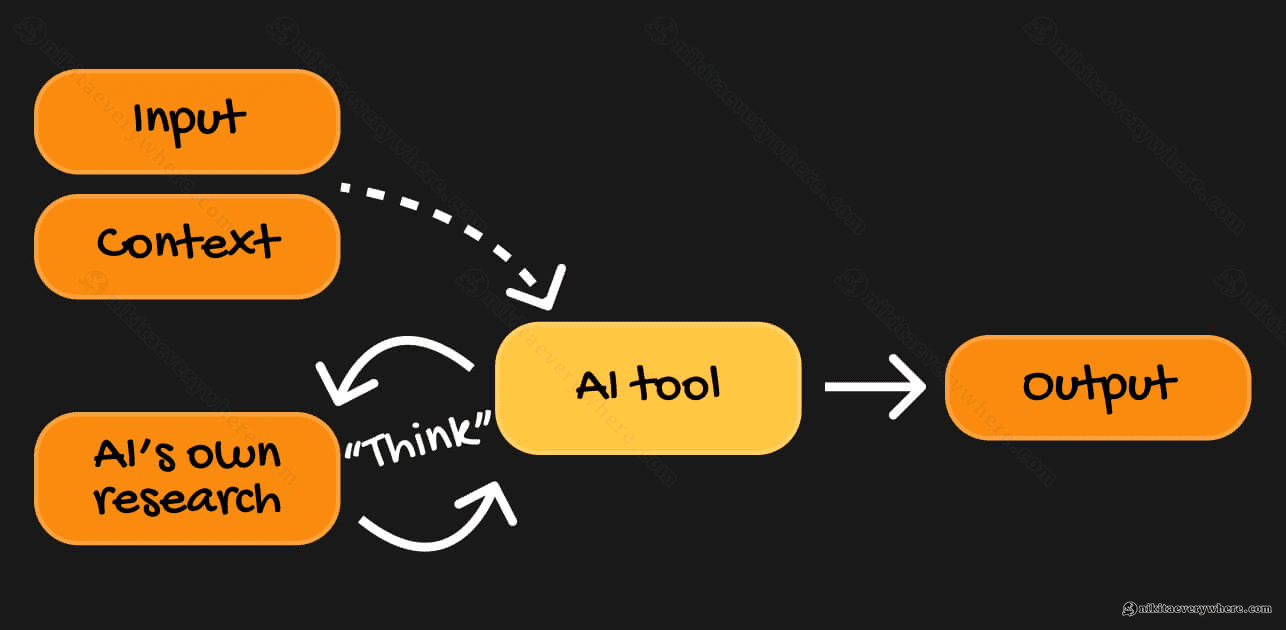
That's genuinely the entire mental model — you provide what you want (the input) and what the model needs to know (the context), and it produces the result. The tool also "thinks" and does its own research on top of that — but the quality of what comes out is directly proportional to the quality of what goes in.
In practice, this looks like: your input is an (often large) prompt describing what you need, plus a TL;DR of your codebase research and existing architecture — and the output is a set of architecture decisions, data model recommendations, or actual code that either matches your expectations or exceeds them.
The key insight you'll quickly arrive at: just give the LLM all the relevant knowledge you as a human have about the problem. Everything you know, everything that matters for the decision — feed it in. The more complete the picture, the better the output. I've watched the same LLM give a junior developer mediocre code and a senior developer production-ready architecture — the difference was entirely in the context provided.
AI Across the Full Development Lifecycle
If you're only using AI to autocomplete code, you're using maybe 10% of what's available. The entire software development lifecycle changed — not just the coding part.
Ideation and Research
You have an idea. Instead of spending weeks on market research alone, you can:
- Describe your idea in one sentence and get it pressure-tested by multiple models (Claude, Gemini, GPT — they're trained on different data, so they respond differently)
- Ask for a competitive landscape analysis — it'll find competitors, Reddit discussions, existing tools
- Validate demand with real data — I recently shared a trick where Google Ads keyword data gives you exact search volumes for free, cross-referenced with Google Trends for trajectory
What used to take a team of people and weeks of research can now be done in hours. Not perfectly — you still need human judgment — but enough to make informed decisions fast.
💡 Pro tip: from everything I tried, "Deep Research" in Claude combined with Gemini's research (owned by Google, the largest data source) did the best job at aggregating the internet for knowledge.
Sometimes during research, I need to ask Claude to control my local browser to access pages it couldn't reach on its own (it won't tell you about this, operating on "enough" context it gathered) — since some resources are not accessible by crawlers and can only be "crawled" by "humans".
Planning and Architecture
This is where I spend the most time. And I mean significantly more time than on actual coding (which is 100% done by AI anyway).
For example, at Arkis, when we're about to introduce a fundamental feature, I load enough context into the LLM — the existing architecture, the constraints, the business requirements — and ask it to outline multiple approaches. It reasons through trade-offs, suggests data structures, considers edge cases. Then I ask it to compare the options, argue against its own recommendations, find weaknesses.
The result isn't a perfect plan. But it's a much better starting point than one human brain could produce alone — especially under time pressure.
Planning mode is king. I can spend days in planning before hitting "execute." And then it executes in ~30 minutes. It self-tests, and when I come to QA... it mostly just works when planned right.
💡 Pro tip: you can use different AI models to challenge each other, as they're trained quite differently. Crucial for planning/architecture.
Generate a few markdown files — plans, system architecture, whatever. Then feed it to another LLM and ask to review. Then iterate.
Design and Prototyping
I can now skip Figma entirely for many use cases. Give the LLM your existing UI, tell it to prototype a new page — 15 minutes later, it's done. It respects your design system, matches your existing patterns.
Visit afterpack.dev — that site was designed through multiple AI iterations until I was happy with the results. The only thing I did manually (besides all the prompting) was the logo. AI still doesn't do great logos.
💡 Pro tip: for creating the initial version of AfterPack's landing page I used Gemini Pro 3 model. It turned out to create much better visuals than Claude's Opus 1.6 (or Sonnet - I don't quite remember), even with plugins for UI/UX.
But Gemini Pro was (maybe, still is) absolutely retarded when it comes to supporting code it generated. So the playbook for sexy landing pages is: ask Gemini to generate the design system and the initial outline, then continue with Claude Code.
Coding
The actual code writing — what most people think of as "programming" — is now the fastest part. Ask Claude Code to refactor 100+ scattered UI component files by new design patterns, and it one-shots the task in 10 minutes. I recently did exactly that with this blog's component base. Previously, that would have been a week of tedious, error-prone work.
💡 Pro tip: still, execution (at least in Claude) is typically done by lower-intelligence models like Sonnet. Their work may not be optimal.
Use a handy /simplify command in Claude Code or ask other models for one more review pass over changes — it improves code quality drastically.
Testing and QA
Who would verify that the product actually works as expected better than a human? This part is perhaps the most satisfying — checking how your AI helper did today and providing your feedback in multiple iterations.
Despite this, for some tasks, AI can write tests, run them, interpret failures, and fix the code — it can even visually test a project by taking screenshots. The feedback loop that used to take hours — write code, run tests, read error, debug, fix, repeat — now happens in a single conversation.
But we all know, AI doesn't have the same taste we do.
💡 Pro tip: on a real already launched product you'll spend most of your time here, verifying your AI agent's work.
Asking another AI agent to review another AI agent's work... Works, but it essentially enables YOLO mode — your project would slowly become not yours.
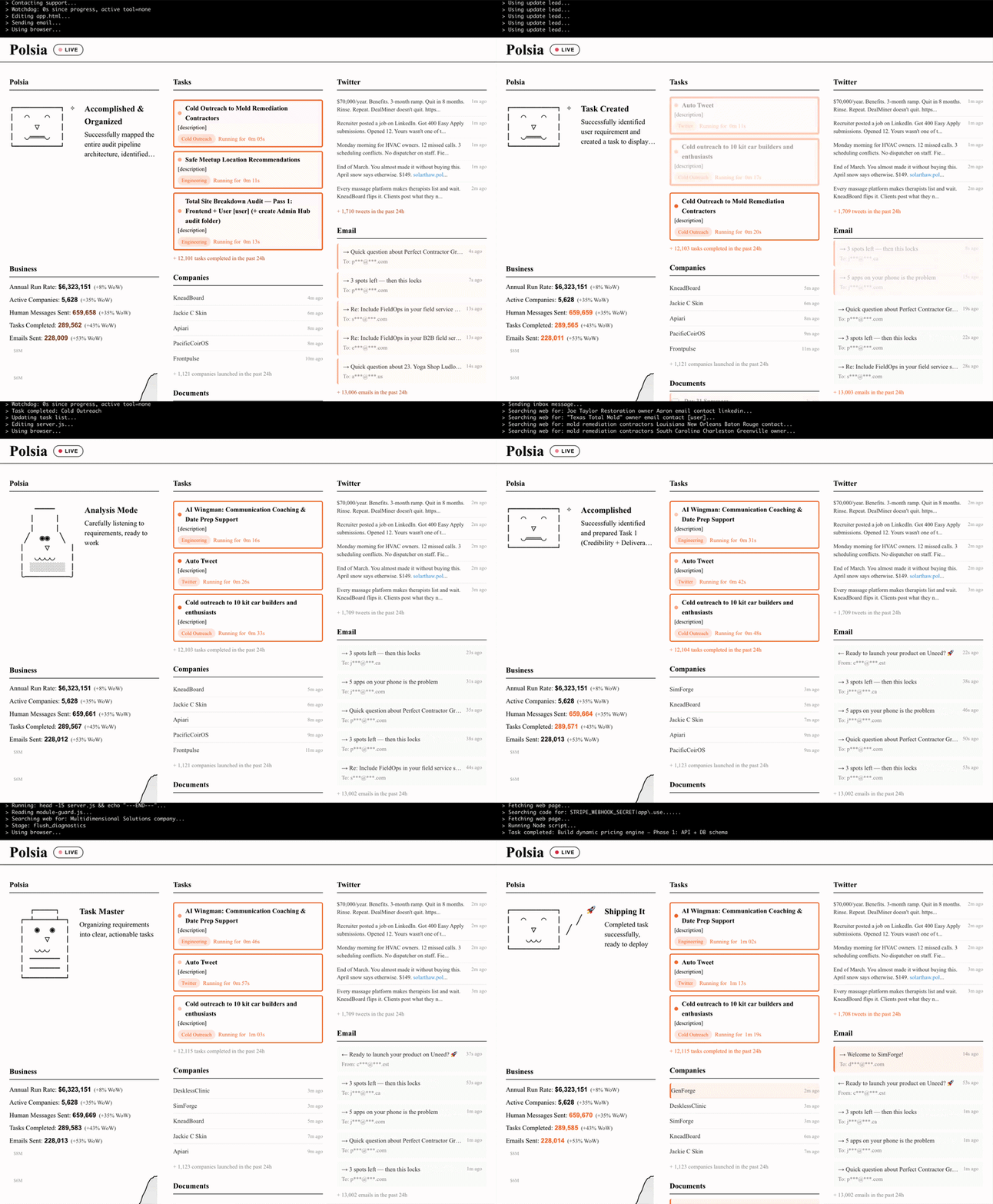
Speaking of YOLO mode — check out Polsia (aha, read it backwards now!). A project that surfaces 100% AI companies run by it, live. Building, fixing, marketing, the full cycle — all by AI agents. You can see the actions happening in real time. Exciting, isn't it?
The Bottleneck Shifted to Humans
When AI tools get that good — you, a human, become the bottleneck.
AI does many things so well that your role shifts to being the judge, the quality controller, the architect who decides what to build and why. A bit of a manager, in a sense — you need to tell AI properly what to do, and then actually evaluate what it did.
But the real bottleneck isn't even you individually — it's human synchronization. Meetings, handoffs, miscommunication, waiting for approvals. In a world where execution takes 30 minutes, spending 3 days aligning on requirements becomes the dominant cost.
There's another side to this though: it's incredibly brain-intensive now. Paradoxically, coding used to be more relaxing — you'd hold one idea in your head for 10–20 minutes, type it out, debug it, move on. Now coding is fast, so you need to think faster. You're the bottleneck, remember? So you try to outperform the LLMs by running 3–5 Claude terminal windows in parallel. One is refactoring a component base, another is implementing a new API endpoint, a third is designing a new feature and writing specs — and you're jumping between them, reviewing outputs, providing context, catching mistakes.
Like in movies we watched way before 2026...

(this is a real picture of my desk before I shipped one 49" monitor back)
Your brain goes TikTok between contexts constantly. Sometimes you deep-focus on one complex architectural decision, sometimes you're just approving small changes across three windows in rapid succession. I can't help but joke that TikTok was created specifically to train our brains for this kind of rapid context switching — and it accidentally prepared an entire generation for AI-assisted software engineering :)
Who Wins in This New World
If you look at who's thriving right now, the pattern is clear — it's all about leverage and low coordination overhead:
- Mission-focused solo developers who can ship entire products alone. Where an entire SaaS or a game was previously built by multiple teams — one experienced and focused person can now implement it with AI-assisted tools.
- Small, harmoniously collaborating teams with clear responsibilities. Less people, less meetings, more shipping.
- Senior+ generalists — the "gold engineers" who are diverse enough to be PM, PO, QA, and dev all in one. They now own entire feature areas, or even entire products, not just code modules.
One person carries the work that previously required a team. For larger projects and enterprises, of course, you still need role separation — but each person's blast radius is dramatically larger than it was even two years ago.
How I Actually Build Software Now: The AfterPack Story
I want to show what this looks like in practice, because the abstract advice only clicks when you see the actual process. I'm building AfterPack — a Rust-based JavaScript obfuscator designed for the AI era.
I spent three weeks on the core architecture — without writing a single line of Rust.
Those three weeks looked like this:
- Documentation first. Lots of
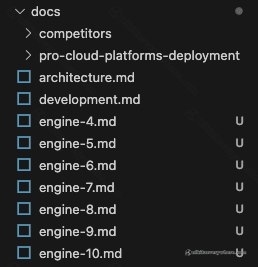
.mdfiles specifying how AfterPack works. Different AI agents on different prompts worked on different parts of the spec. More than 20 docs already, not a single line of Rust written (except conceptual testing with JavaScript) — just careful system design. - JavaScript prototyping. Before writing Rust code, I prototyped the obfuscation transforms in JavaScript. Multiple iterations. Agents that tried to break the prototyped obfuscator and then suggested improvements.
- Adversarial testing. I left Claude Code running overnight with a simple success metric: "keep iterating until a fresh Claude instance with no context can't deobfuscate the example output." It ran, iterated, and improved the transforms autonomously.
Compare this to the "classic" approach — one or a few humans doing all of the research, architecture, prototyping, and adversarial testing, often biased by their own experience and always bottlenecked by available hours.
Oh, and I'm writing production Rust. A language I'd barely touched before. Because my actual language is English now — I focus on architecture, data structures, algorithms, and patterns. The LLM handles the rest Rust.
Fun fact: The previous generation of JavaScript obfuscators took their creators 2–3 years to build. I'm on track to ship something more advanced in a fraction of that time. This is what I personally experience with DataUnlocker too — years of work, now condensable into months solo.
What I Learned About Working with AI Effectively
If I had to distill everything into one insight, it's this: context is everything. Remember the magic box — the quality of what comes out depends entirely on what goes in. Before asking an LLM to build something, I write documentation first. I describe what I want, why, what the constraints are, what "good" looks like. I load existing codebases, architecture docs, style guides. The more specific your context, the less back-and-forth you'll need.
The biggest mistake I see developers make with AI tools is treating them like fancy autocomplete — jumping straight to code generation. Don't. Start in planning mode. Ask for multiple architectural approaches. Have the model argue against its own recommendations. Prototype in a simpler language first if the target is complex (I prototype Rust logic in JavaScript). Only then, with a solid plan, let it execute.
By the way, the skill of Googling the right query? It evolved into prompting the right question — same muscle, just more powerful. Be specific about what you want and why. Provide examples of desired output. If the response isn't right, don't just re-prompt — add more context. And try asking different models the same question: Claude, Gemini, GPT will each give you a different perspective, because they're trained on different data.
The best results come from multi-turn conversations, not single prompts — start broad ("pressure-test my idea"), get specific ("design the data layer given these constraints"), execute ("implement this spec"), validate ("write tests, run them, fix failures"). It's a conversation, not a command line.
And one more thing: own the architecture. AI can implement any architecture you describe — your job is to describe the right one. You're the one who understands the business context, the team constraints, the maintenance burden. That's the part that won't be automated anytime soon.
A Note on Tooling: Why Claude
I should mention the tool that made most of this possible for me. I'm not an ambassador or a promoter — just a very happy user who thinks Claude is the iPhone of the software world right now. I wrote about it on LinkedIn a couple of months ago, and my opinion hasn't changed.
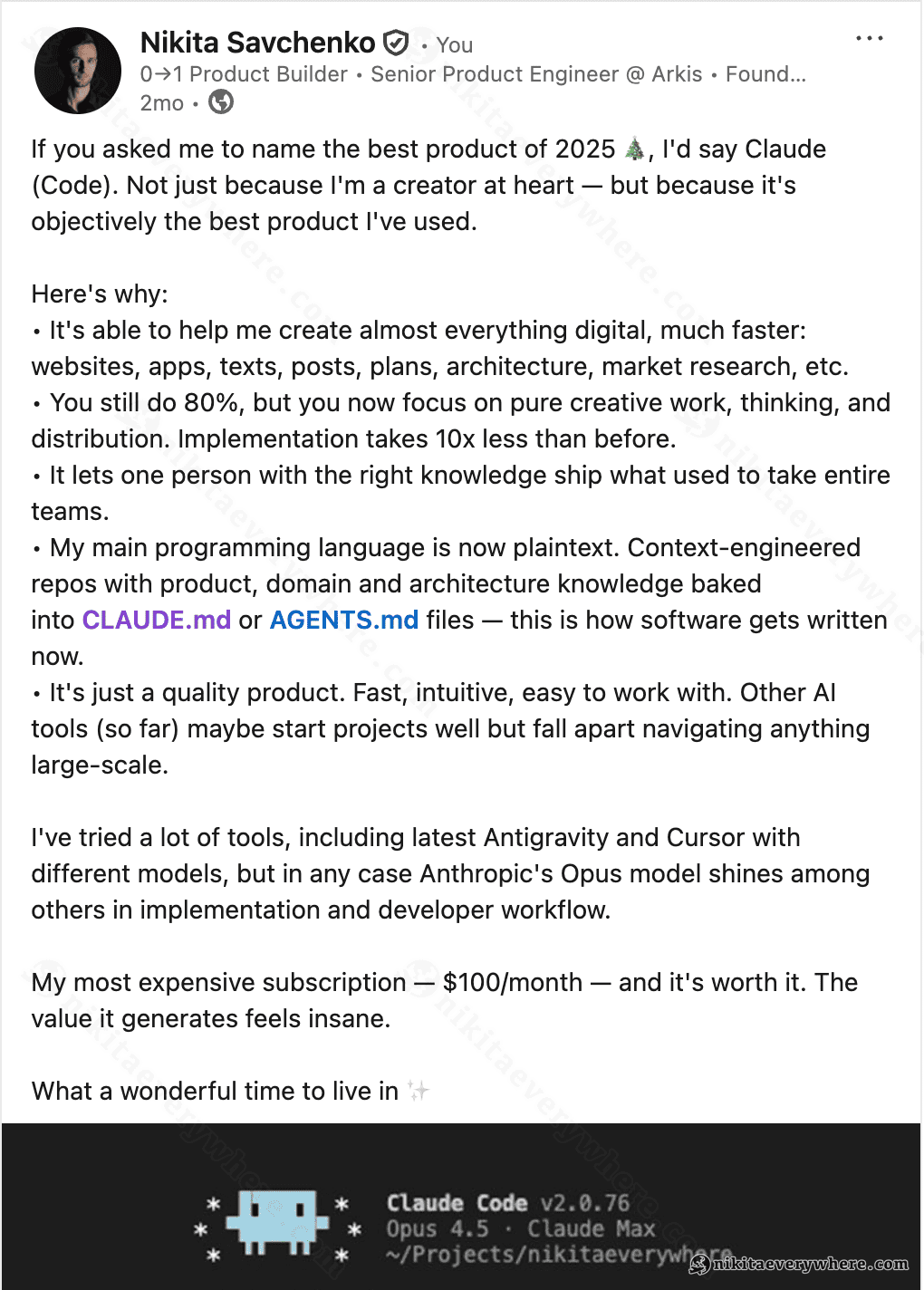
At the time of writing, nobody has a model as capable as Opus for software engineering, and Claude Code as a tool just works — fast, intuitive, handles large codebases without falling apart. I've tried Cursor, Antigravity, and other tools with different models, but Anthropic's Opus consistently shines in implementation quality and developer workflow.
My most expensive subscription — $100/month — and it's worth every cent. The value it generates is insane.
Will AI Replace Software Engineers?
I get asked this a lot — I spoke about it at a panel discussion in Krakow, and it comes up in pretty much every tech conversation now. My honest answer: no, but the role is changing fast.
What we call "AI" in this context is tooling — very, very good tooling. The abstraction layer moved up, from writing code to designing systems, from implementing features to defining what features should exist and why. Compilers didn't eliminate programmers. Spreadsheets didn't eliminate accountants. But the people who refuse to use the new tools will fall behind, and the people who master them become dramatically more productive.
One thought that keeps coming back to me: we've gotten incredibly close to replicating how humans work. AI agents have their own "system prompts" (upbringing), tools (skills), and context (memory). The line between human and AI reasoning is slowly blurring. But the limit — what I call the Exponential Complexity Barrier — is that the more an AI knows, the more contradictions it has to resolve, and every resolution is effectively a bias. That's the wall, at least for now.
Where to Start
If you've never written software — get Claude Code or any AI coding assistant, open the terminal, and just describe what you want to build in plain English. Seriously, just do it. You'll learn from watching it reason through the problem, and you'll have something working by the end of the day.
If you already write software but haven't taken AI tools seriously — try building your next feature entirely through AI-assisted development. Planning, implementation, testing, all of it. Give it enough context and see what happens.
If you're already using AI daily — focus on the context game. Write better documentation before coding. Spend more time in planning mode. Try building something in a language you've never used — you'll find the barrier is lower than you think.
And if you're a team lead — the biggest productivity gains aren't in individual coding speed, they're in reducing coordination overhead. Empower your best engineers to own larger areas. Rethink whether every process and every meeting is still necessary when execution is this fast.
P.S. If you know someone who's just getting into software engineering — share this with them. Everyone deserves that mentor I wished for fifteen years ago! :)
P.P.S. No wonder this article is AI-assisted too. 30-minute braindump and a few hours of polishing & adding graphics and here we go.