
How to Create a Shared Vacation Calendar in Google Workspace
A shared vacation calendar in Google Workspace is one of those problems that every company has and that is surprisingly still not solved out of the box. You'd think Google would have a native "team vacations" view — they don't.
Important to know: Google Calendar has a dedicated "Out of Office" event type — selectable in the event type tabs — that auto-declines meetings and shows your status across Workspace. Most people never use it because they just create a regular event titled "Vacation", and thus lose Google Calendar integration features.
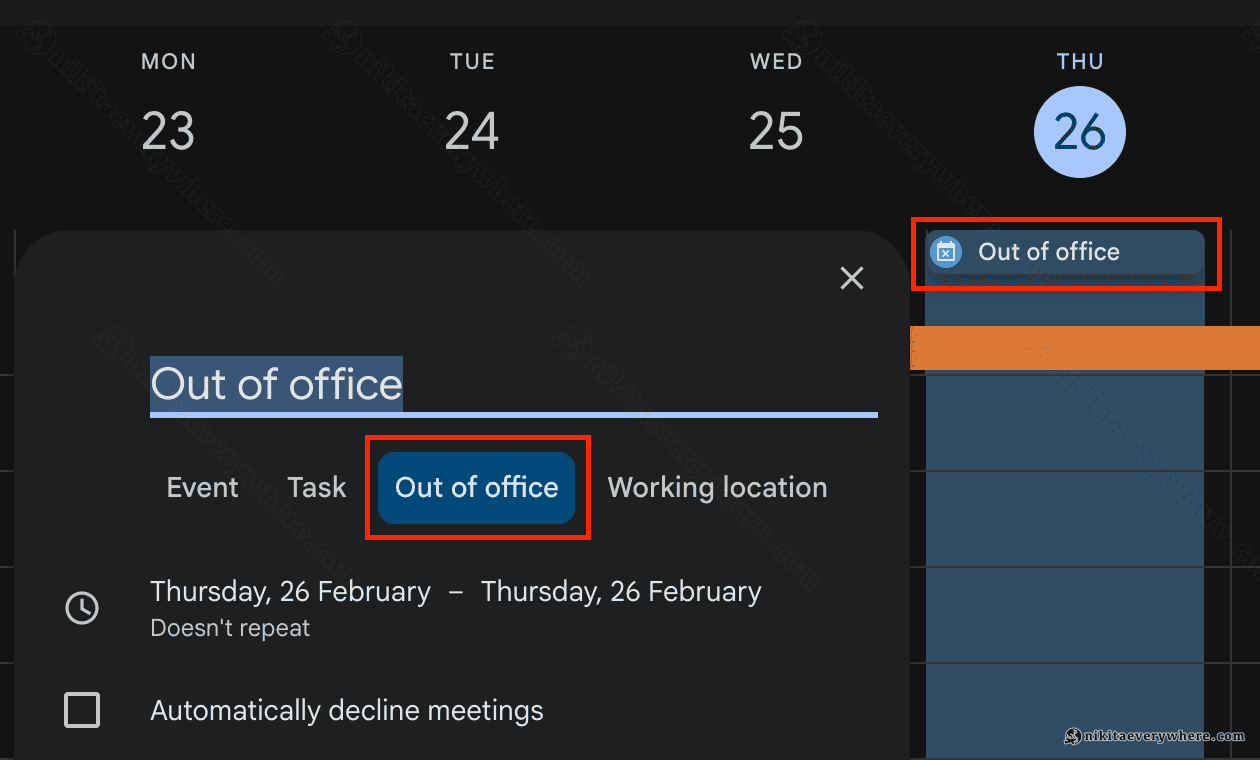
So what do teams do? Check Slack statuses. Ping people. Or worse — make everyone manually enter or duplicate their time off into a separate shared calendar on top of the native "Out of office" event they could create in their own. That shared calendar entry or double-entry is surprisingly common, and it's completely unnecessary.
There's a Google Calendar native solution: Google Apps Script that automatically syncs everyone's vacations, OOO days, and time off into a single shared calendar. You create an OOO event in your own calendar once — it integrates with Google services natively and shows up on the team calendar automatically.
Google actually has an official Apps Script sample for this, but it has several critical bugs — it doesn't handle recurring events, ignores the "Out of office" event type, can't update or remove changed events, and breaks on full-day events crossing DST boundaries. It wasn't a good fit for our company. And I guess it won't be for many.
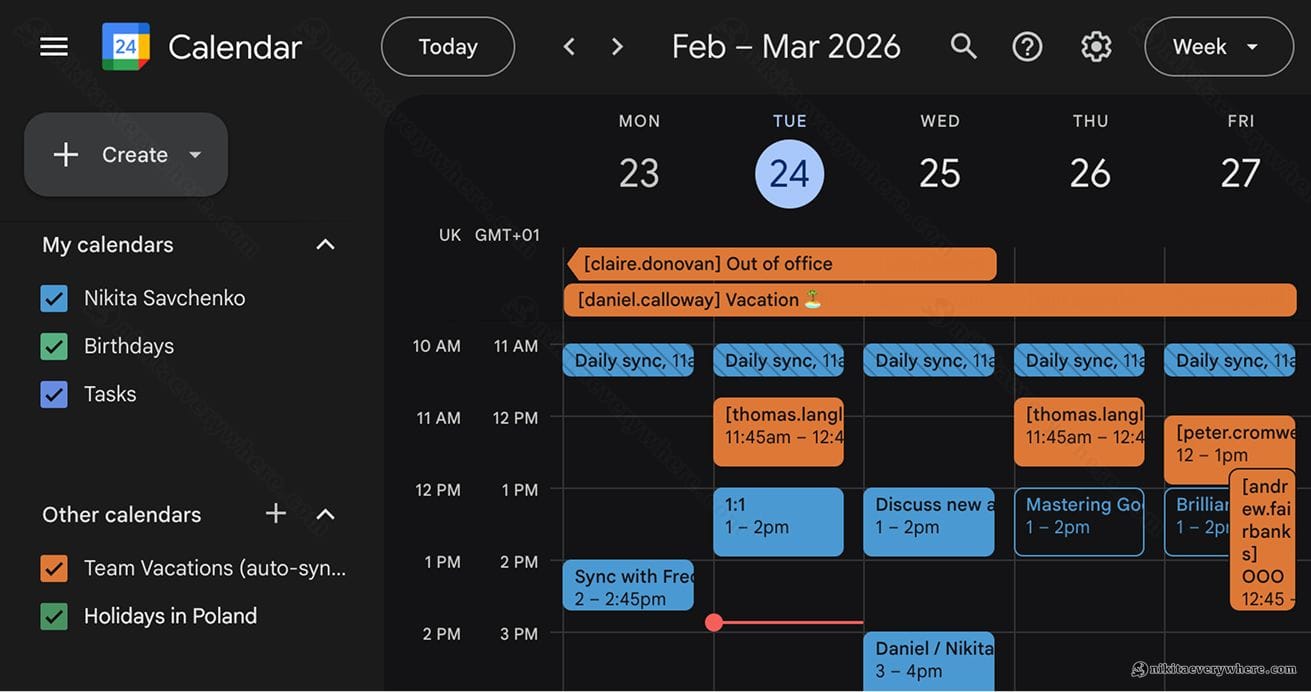
So I fixed all of these issues. Take a look at the new shared vacation calendar:
What the Script Does
The end result is a shared Google Calendar that automatically syncs vacation and out-of-office events from every team member's personal calendar. The script runs every hour and keeps the shared calendar up to date — no manual work needed.
Key improvements over Google's original sample:
- Full-day event conversion with DST handling — events longer than ~23 hours get converted to all-day events, with a 2-hour fuzz to handle daylight saving transitions
- "Out of office" event type sync — Google Calendar has a dedicated Out of office event type that the original script ignores entirely. This version syncs them regardless of their title
- Event updates — when someone changes the time or details of their vacation, the shared calendar updates automatically
- Deletion sync — cancelled or deleted events get removed from the shared calendar
- Recurring event instance patching — single-instance modifications of recurring events (like changing one Friday off in a recurring schedule) are handled correctly
Prerequisites
Before you start, make sure you have:
- A Google Workspace account
- Access to create a new shared calendar and a Google Group with all company members, if it doesn't exist yet.
- 10 minutes of setup time
Step 1: Create the Shared Calendar
Go to Google Calendar and create a new calendar — something like "Team Vacations" or "Out of Office".
Important: team members should only have "See all event details" permission on this calendar. They should not have edit access. The whole point is that everyone just manages their own personal calendar — the script syncs everything to the shared one automatically.
This new shared calendar also becomes visible to all members once created.
Copy the calendar's ID from its settings page (it looks like c_abc123...@group.calendar.google.com). You'll need it in Step 3.
Step 2: Create a Google Group
The script needs to know who's on your team. It uses a Google Group — essentially a mailing list — to get the list of team members and iterate over their calendars.
Go to Google Groups, create a group (e.g., team@yourcompany.com), and add your team members.
If you already have a company-wide group, you can use that. The script also supports multiple groups — just change GROUP_EMAIL to an array.
Step 3: Set Up the Apps Script
Google Apps Script is a JavaScript-based scripting platform built into Google Workspace. It can access Google Calendar, Gmail, Sheets, and other services directly — no server needed.
Here's how to set it up:
- Go to script.google.com and create a new project
- In the left sidebar, click Services (the
+icon), find Google Calendar API, and add it. This enables the advanced Calendar service that the script uses for importing and updating events - Replace the default
Code.gscontent with the full script (see below) - Update the two configuration variables at the top:
TEAM_CALENDAR_ID— the calendar ID from Step 1GROUP_EMAIL— the email address of the Google Group from Step 2
- Run the
setup()function — it creates an hourly trigger and runs the first sync immediately
The first run will ask for authorization to access calendars and groups. After that, the script runs automatically every hour.
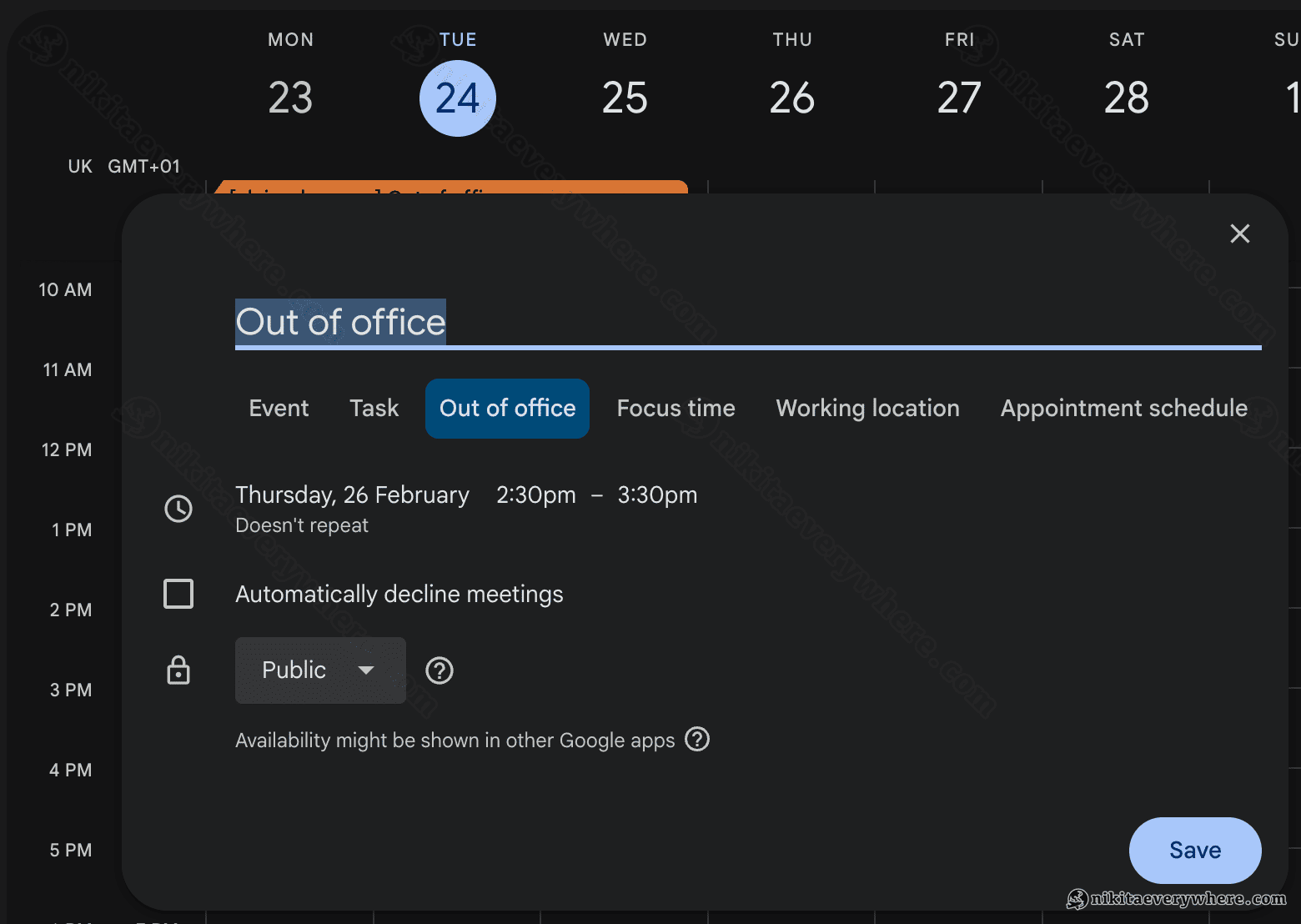
Now, whenever anyone on the team creates an "Out of Office" event, or a normal event with keywords like "OOO", "Out of Office", "Vacation", etc. — it gets synced to the shared team calendar automatically.
Important Tips
Share the script with a colleague! By default, if you created the script, it runs from your Google account. If you ever leave the company, the trigger stops. Have at least one other person with editor access to the Apps Script project so they can re-run setup() if needed.
Don't edit the shared calendar manually. This is the best part — nobody needs to maintain the shared calendar. No more double-entry. Everyone just creates an "Out of office" event in their own calendar once — it integrates with Google services natively (auto-declining meetings, etc.) and the script syncs it to the team calendar automatically. Manual edits to the shared calendar may get overwritten.
The script reads public calendar data only. It accesses events through the Calendar API using the group members' email addresses. It can only see events that are visible to the script owner — typically free/busy status and event titles for colleagues in the same Workspace organization.
Customize the keywords. By default, the script looks for events containing "vacation", "ooo", "out of office", or "offline" in the title. You can modify the KEYWORDS array to match your team's conventions. Events using Google Calendar's native "Out of office" type are always synced regardless of their title.
How It Works
The script enhances Google's original vacation calendar sample with robust event lifecycle management:
- Discovery — iterates over all members of the Google Group, searching each person's calendar for events matching the configured keywords, plus any events with the
outOfOfficeevent type - Import/Update — uses
iCalUID-based import for new events (fast path) and falls back to find-and-update for existing ones. This means changed events — renamed, rescheduled, extended — get updated automatically - Deletion — cancelled events (including deleted recurring instances) are detected via
showDeleted: trueand removed from the shared calendar - All-day conversion — timed events lasting 23+ hours get converted to proper all-day events. This uses a 2-hour DST fuzz so a 24-hour event spanning a DST transition (which becomes 23h or 25h) still converts correctly
- Recurring instances — single-instance modifications of recurring events are patched individually without breaking the recurring series on the shared calendar
The Full Script
Below is the full script's code letting you populate shared vacations calendar:
▶Full script (click to expand)
1// Updated by Nikita Savchenko to2// a. Sync >23h events as full-day events, taking into account time shifts3// b. Sync events from "Out of office" calendar type regardless of their title4// c. Update already-synced events when their source changes (recurrence, time, etc.)5// d. Remove synced events when the source event is cancelled/deleted6// e. Handle single-instance modifications of recurring events7 8// To learn how to use this script, refer to the documentation:9// https://developers.google.com/apps-script/samples/automations/vacation-calendar10 11/*12Copyright 2022 Google LLC13 14Licensed under the Apache License, Version 2.0 (the "License");15you may not use this file except in compliance with the License.16You may obtain a copy of the License at17 18 https://www.apache.org/licenses/LICENSE-2.019 20Unless required by applicable law or agreed to in writing, software21distributed under the License is distributed on an "AS IS" BASIS,22WITHOUT WARRANTIES OR CONDITIONS OF ANY KIND, either express or implied.23See the License for the specific language governing permissions and24limitations under the License.25*/26 27// Set the ID of the team calendar to add events to. You can find the calendar's28// ID on the settings page.29let TEAM_CALENDAR_ID = "ENTER_TEAM_CALENDAR_ID_HERE";30 31// Set the email address of the Google Group that contains everyone in the team.32// Ensure the group has less than 500 members to avoid timeouts.33// Change to an array in order to add indirect members from multiple groups, for example:34// let GROUP_EMAIL = ['group1@company.com', 'group2@company.com'];35let GROUP_EMAIL = "ENTER_GOOGLE_GROUP_EMAIL_HERE";36 37let ONLY_DIRECT_MEMBERS = false;38 39let KEYWORDS = ["vacation", "ooo", "out of office", "offline"];40let MONTHS_IN_ADVANCE = 3;41 42// Thresholds for deciding when to convert a timed event to an all-day event.43// We use a 2-hour fuzz to safely handle DST transitions (23h or 25h days).44const DAY_MS = 24 * 60 * 60 * 1000;45const DST_FUZZ_MS = 2 * 60 * 60 * 1000;46 47/**48 * Sets up the script to run automatically every hour.49 */50function setup() {51 let triggers = ScriptApp.getProjectTriggers();52 if (triggers.length > 0) {53 throw new Error("Triggers are already setup.");54 }55 ScriptApp.newTrigger("sync").timeBased().everyHours(1).create();56 // Runs the first sync immediately.57 sync();58}59 60/**61 * One-time helper: clears lastRun so the next sync re-processes all events62 * in the MONTHS_IN_ADVANCE window. Useful after deploying code changes to63 * pick up previously-missed updates. Delete after use.64 */65function resetLastRun() {66 PropertiesService.getScriptProperties().deleteProperty("lastRun");67 console.log("lastRun cleared — next sync will do a full scan");68}69 70/**71 * Looks through the group members' public calendars and adds any72 * 'vacation' or 'out of office' events to the team calendar.73 */74function sync() {75 // Defines the calendar event date range to search.76 let today = new Date();77 let maxDate = new Date();78 maxDate.setMonth(maxDate.getMonth() + MONTHS_IN_ADVANCE);79 80 // Determines the time the script was last run.81 let lastRun = PropertiesService.getScriptProperties().getProperty("lastRun");82 lastRun = lastRun ? new Date(lastRun) : null;83 84 // Gets the list of users in the Google Group.85 let users = getAllMembers(GROUP_EMAIL);86 if (ONLY_DIRECT_MEMBERS) {87 users = GroupsApp.getGroupByEmail(GROUP_EMAIL).getUsers();88 } else if (Array.isArray(GROUP_EMAIL)) {89 users = getUsersFromGroups(GROUP_EMAIL);90 }91 92 // For each user, find events with the keywords and import them.93 let counts = { imported: 0, updated: 0, removed: 0, errors: 0 };94 users.forEach(function (user) {95 let username = user.getEmail().split("@")[0];96 let processedIds = new Set();97 KEYWORDS.forEach(function (keyword) {98 let events = findEvents(user, keyword, today, maxDate, lastRun);99 events.forEach(function (event) {100 let uid = eventUID(event);101 if (processedIds.has(uid)) return;102 processedIds.add(uid);103 let result = importOrUpdateEvent(username, event);104 if (result) counts[result]++;105 });106 });107 108 // Also import native Out of office events if their titles don't match keywords.109 let oooEvents = findEvents(user, null, today, maxDate, lastRun);110 oooEvents.forEach(function (event) {111 let uid = eventUID(event);112 if (event.eventType === "outOfOffice" && !processedIds.has(uid)) {113 processedIds.add(uid);114 let result = importOrUpdateEvent(username, event);115 if (result) counts[result]++;116 }117 });118 });119 120 PropertiesService.getScriptProperties().setProperty("lastRun", today);121 console.log(122 "Done — imported: %s, updated: %s, removed: %s, errors: %s",123 counts.imported,124 counts.updated,125 counts.removed,126 counts.errors,127 );128}129 130/**131 * Returns a deduplication key for an event. For recurring-event instances132 * this includes the instance identifier so we don't confuse them with133 * the master event.134 * @param {Calendar.Event} event135 * @return {string}136 */137function eventUID(event) {138 let base = event.iCalUID || event.id;139 // For recurring instances, append the original start time to make the key unique.140 if (event.recurringEventId && event.originalStartTime) {141 let orig =142 event.originalStartTime.dateTime || event.originalStartTime.date || "";143 return base + "::" + orig;144 }145 return base;146}147 148/**149 * Imports or updates the given event from the user's calendar into the shared150 * team calendar. If the event was cancelled/deleted, removes it from the team151 * calendar instead.152 * @param {string} username The team member that is attending the event.153 * @param {Calendar.Event} event The event to import.154 * @return {string|null} 'imported', 'updated', 'removed', 'errors', or null.155 */156function importOrUpdateEvent(username, event) {157 // Handle cancelled / deleted events.158 if (event.status === "cancelled") {159 if (event.recurringEventId) {160 return removeRecurringInstance(event);161 }162 return removeTeamEvent(event);163 }164 165 event.summary = "[" + username + "] " + event.summary;166 event.organizer = { id: TEAM_CALENDAR_ID };167 event.attendees = [];168 169 // If the event is not of type 'default', it cannot be imported as-is.170 if (event.eventType != "default") {171 event.eventType = "default";172 delete event.outOfOfficeProperties;173 delete event.focusTimeProperties;174 }175 176 // If this timed event lasts ≥ ~24h, convert it to an all-day event177 // to avoid cross-timezone bar shifts on the team calendar.178 maybeMakeAllDay(event);179 180 // Single-instance modification of a recurring event — patch that instance.181 if (event.recurringEventId) {182 return patchRecurringInstance(event);183 }184 185 // Try import first (fast path for new events).186 try {187 Calendar.Events.import(event, TEAM_CALENDAR_ID);188 console.log("Imported: %s", event.summary);189 return "imported";190 } catch (e) {191 // Import fails when an event with this iCalUID already exists.192 // Fall through to update logic.193 }194 195 // Event already exists — find it by iCalUID and update.196 try {197 let existing = findTeamEventByUID(event.iCalUID);198 if (existing) {199 let teamEventId = existing.id;200 event.id = teamEventId;201 Calendar.Events.update(event, TEAM_CALENDAR_ID, teamEventId);202 console.log("Updated: %s", event.summary);203 return "updated";204 } else {205 console.error(206 "Import failed and no existing event found for iCalUID: %s. Skipping.",207 event.iCalUID,208 );209 return "errors";210 }211 } catch (e) {212 console.error(213 'Error updating event "%s": %s. Skipping.',214 event.summary,215 e.toString(),216 );217 return "errors";218 }219}220 221/**222 * Finds the team-calendar instance that corresponds to a source recurring-event223 * instance, by matching iCalUID + originalStartTime.224 * @param {Calendar.Event} sourceInstance The instance from the source calendar.225 * @return {Calendar.Event|null} The matching team-calendar instance, or null.226 */227function findTeamInstance(sourceInstance) {228 if (!sourceInstance.iCalUID || !sourceInstance.originalStartTime) return null;229 230 // Find the master recurring event on the team calendar.231 let master = findTeamEventByUID(sourceInstance.iCalUID);232 if (!master) return null;233 234 // Determine the original start of this particular instance.235 let origDT =236 sourceInstance.originalStartTime.dateTime ||237 sourceInstance.originalStartTime.date;238 if (!origDT) return null;239 let origMs = new Date(origDT).getTime();240 241 // List instances of the master event in a narrow window around the original start.242 let windowStart = new Date(origMs - DAY_MS);243 let windowEnd = new Date(origMs + DAY_MS);244 let response = Calendar.Events.instances(TEAM_CALENDAR_ID, master.id, {245 timeMin: formatDateAsRFC3339(windowStart),246 timeMax: formatDateAsRFC3339(windowEnd),247 });248 249 if (!response.items) return null;250 for (let i = 0; i < response.items.length; i++) {251 let inst = response.items[i];252 if (!inst.originalStartTime) continue;253 let instDT = inst.originalStartTime.dateTime || inst.originalStartTime.date;254 if (instDT && new Date(instDT).getTime() === origMs) {255 return inst;256 }257 }258 return null;259}260 261/**262 * Patches a single instance of a recurring event on the team calendar.263 * Uses patch() to update only the changed fields without breaking the264 * recurring event structure.265 * @param {Calendar.Event} event The modified instance from the source calendar.266 * @return {string|null} 'updated', 'errors', or null.267 */268function patchRecurringInstance(event) {269 try {270 let instance = findTeamInstance(event);271 if (!instance) {272 console.error(273 "No matching team-calendar instance found for: %s (originalStartTime: %s). Skipping.",274 event.summary,275 JSON.stringify(event.originalStartTime),276 );277 return "errors";278 }279 280 // Patch only the fields that matter for display.281 let patch = {282 summary: event.summary,283 start: event.start,284 end: event.end,285 };286 if (event.description !== undefined) patch.description = event.description;287 if (event.location !== undefined) patch.location = event.location;288 if (event.status) patch.status = event.status;289 290 Calendar.Events.patch(patch, TEAM_CALENDAR_ID, instance.id);291 console.log("Updated instance: %s", event.summary);292 return "updated";293 } catch (e) {294 console.error(295 'Error patching recurring instance "%s": %s. Skipping.',296 event.summary,297 e.toString(),298 );299 return "errors";300 }301}302 303/**304 * Removes a cancelled instance of a recurring event from the team calendar.305 * @param {Calendar.Event} event The cancelled instance from the source calendar.306 * @return {string|null} 'removed' or 'errors'.307 */308function removeRecurringInstance(event) {309 try {310 let instance = findTeamInstance(event);311 if (instance) {312 Calendar.Events.remove(TEAM_CALENDAR_ID, instance.id);313 console.log(314 "Removed recurring instance (iCalUID: %s, originalStartTime: %s)",315 event.iCalUID,316 JSON.stringify(event.originalStartTime),317 );318 return "removed";319 }320 } catch (e) {321 console.error(322 "Error removing recurring instance (iCalUID: %s): %s. Skipping.",323 event.iCalUID,324 e.toString(),325 );326 return "errors";327 }328 return null;329}330 331/**332 * Removes a cancelled/deleted event from the team calendar by iCalUID.333 * @param {Calendar.Event} event The cancelled source event.334 * @return {string|null} 'removed' or 'errors'.335 */336function removeTeamEvent(event) {337 if (!event.iCalUID) return null;338 try {339 let existing = findTeamEventByUID(event.iCalUID);340 if (existing) {341 Calendar.Events.remove(TEAM_CALENDAR_ID, existing.id);342 console.log(343 "Removed cancelled event: %s (iCalUID: %s)",344 existing.summary,345 event.iCalUID,346 );347 return "removed";348 }349 } catch (e) {350 console.error(351 "Error removing event (iCalUID: %s): %s. Skipping.",352 event.iCalUID,353 e.toString(),354 );355 return "errors";356 }357 return null;358}359 360/**361 * Finds an event on the team calendar by its iCalUID.362 * @param {string} iCalUID The iCalUID to search for.363 * @return {Calendar.Event|null} The matching event, or null.364 */365function findTeamEventByUID(iCalUID) {366 if (!iCalUID) return null;367 let response = Calendar.Events.list(TEAM_CALENDAR_ID, { iCalUID: iCalUID });368 if (response.items && response.items.length > 0) {369 return response.items[0];370 }371 return null;372}373 374/**375 * In a given user's calendar, looks for occurrences of the given keyword376 * in events within the specified date range and returns any such events found.377 * @param {Session.User} user The user to retrieve events for.378 * @param {string} keyword The keyword to look for.379 * @param {Date} start The starting date of the range to examine.380 * @param {Date} end The ending date of the range to examine.381 * @param {Date} optSince A date indicating the last time this script was run.382 * @return {Calendar.Event[]} An array of calendar events.383 */384function findEvents(user, keyword, start, end, optSince) {385 let params = {386 timeMin: formatDateAsRFC3339(start),387 timeMax: formatDateAsRFC3339(end),388 showDeleted: true,389 };390 if (keyword) {391 params.q = keyword;392 }393 if (optSince) {394 params.updatedMin = formatDateAsRFC3339(optSince);395 }396 let pageToken = null;397 let events = [];398 do {399 params.pageToken = pageToken;400 let response;401 try {402 response = Calendar.Events.list(user.getEmail(), params);403 } catch (e) {404 console.error(405 "Error retrieving events for %s, %s: %s; skipping",406 user,407 keyword,408 e.toString(),409 );410 continue;411 }412 events = events.concat(413 response.items.filter(function (item) {414 return shouldImportEvent(user, keyword, item);415 }),416 );417 pageToken = response.nextPageToken;418 } while (pageToken);419 return events;420}421 422/**423 * Determines if the given event should be imported into the shared team calendar.424 * @param {Session.User} user The user that is attending the event.425 * @param {string} keyword The keyword being searched for.426 * @param {Calendar.Event} event The event being considered.427 * @return {boolean} True if the event should be imported.428 */429function shouldImportEvent(user, keyword, event) {430 // Always let cancelled events through so they can be removed from the team calendar.431 if (event.status === "cancelled") {432 return true;433 }434 // Always accept native Out of office entries even if the title was changed.435 if (event.eventType === "outOfOffice") {436 return true;437 }438 // Ensure summary exists and contains the keyword.439 if (440 !keyword ||441 !event.summary ||442 event.summary.toLowerCase().indexOf(keyword) < 0443 ) {444 return false;445 }446 // If the user is the creator of the event, always import it.447 if (!event.organizer || event.organizer.email == user.getEmail()) {448 return true;449 }450 // Only import events the user has accepted.451 if (!event.attendees) return false;452 let matching = event.attendees.filter(function (attendee) {453 return attendee.self;454 });455 return matching.length > 0 && matching[0].responseStatus == "accepted";456}457 458/**459 * Returns an RFC3339 formatted date String corresponding to the given Date object.460 * @param {Date} date a Date.461 * @return {string} a formatted date string.462 */463function formatDateAsRFC3339(date) {464 return Utilities.formatDate(date, "UTC", "yyyy-MM-dd'T'HH:mm:ssZ");465}466 467/**468 * If the source event is a timed event of length ≥ ~24h (DST tolerant),469 * convert it to an all-day event by setting start.date and end.date.470 * end.date is exclusive. If the event ends exactly at 00:00 local time,471 * we keep end.date equal to that end date. Otherwise we add +1 day.472 * No-op if the event is already all-day or lacks dateTime boundaries.473 * @param {Calendar.Event} event474 */475function maybeMakeAllDay(event) {476 if (!event || !event.start || !event.end) return;477 // Already all-day? Nothing to do.478 if (event.start.date || event.end.date) return;479 if (!event.start.dateTime || !event.end.dateTime) return;480 481 // Compute duration in ms, tolerant to DST (±2h).482 var startMs = new Date(event.start.dateTime).getTime();483 var endMs = new Date(event.end.dateTime).getTime();484 if (isNaN(startMs) || isNaN(endMs)) return;485 var dur = endMs - startMs;486 if (dur < DAY_MS - DST_FUZZ_MS) return; // < ~22h → keep as timed487 488 // Extract YYYY-MM-DD from the original RFC3339 strings.489 var startDateStr = datePartYYYYMMDD_(event.start.dateTime);490 var endDateStr = datePartYYYYMMDD_(event.end.dateTime);491 if (!startDateStr || !endDateStr) return;492 493 // For all-day events, end.date is EXCLUSIVE.494 // If the event ends exactly at 00:00 local time, use the same end date.495 // Otherwise, include that last day by adding +1.496 var exclusiveEnd = isMidnightRFC3339_(event.end.dateTime)497 ? endDateStr498 : addDaysYMD_(endDateStr, 1);499 500 // Rewrite as all-day and remove time-specific fields/timezones.501 event.start = { date: startDateStr };502 event.end = { date: exclusiveEnd };503}504 505/**506 * Return 'YYYY-MM-DD' from an RFC3339 dateTime string.507 * @param {string} dt508 * @return {string|null}509 */510function datePartYYYYMMDD_(dt) {511 if (!dt || typeof dt !== "string") return null;512 // RFC3339 begins with YYYY-MM-DD; safe to slice first 10 chars.513 return dt.length >= 10 ? dt.substring(0, 10) : null;514}515 516/**517 * Add days to a 'YYYY-MM-DD' string and return a new 'YYYY-MM-DD'.518 * Uses UTC math to avoid timezone surprises.519 * @param {string} ymd520 * @param {number} days521 * @return {string}522 */523function addDaysYMD_(ymd, days) {524 var parts = ymd.split("-").map(function (p) {525 return parseInt(p, 10);526 });527 var y = parts[0],528 m = parts[1],529 d = parts[2];530 var date = new Date(Date.UTC(y, m - 1, d));531 date.setUTCDate(date.getUTCDate() + days);532 return Utilities.formatDate(date, "UTC", "yyyy-MM-dd");533}534 535/**536 * Returns true if an RFC3339 dateTime string has a local time of exactly 00:00[:00[.sss]].537 * Works purely on the string (doesn't convert timezones), so it is safe across offsets.538 * @param {string} dt539 * @return {boolean}540 */541function isMidnightRFC3339_(dt) {542 if (!dt || typeof dt !== "string") return false;543 // Extract HH:MM[:SS[.sss]] part between 'T' and 'Z'/'+'/'-'.544 var m = dt.match(/T(\d{2}):(\d{2})(?::(\d{2})(?:\.\d{1,3})?)?/);545 if (!m) return false;546 var hh = parseInt(m[1], 10);547 var mm = parseInt(m[2], 10);548 var ss = m[3] ? parseInt(m[3], 10) : 0;549 return hh === 0 && mm === 0 && ss === 0;550}551 552/**553 * Get both direct and indirect members (and delete duplicates).554 * @param {string|Array<string>} groupEmail the e-mail address of the group, or array of addresses.555 * @return {object[]} direct and indirect members.556 */557function getAllMembers(groupEmail) {558 if (Array.isArray(groupEmail)) {559 return getUsersFromGroups(groupEmail);560 }561 var group = GroupsApp.getGroupByEmail(groupEmail);562 var users = group.getUsers();563 var childGroups = group.getGroups();564 for (var i = 0; i < childGroups.length; i++) {565 var childGroup = childGroups[i];566 users = users.concat(getAllMembers(childGroup.getEmail()));567 }568 // Remove duplicate members569 var uniqueUsers = [];570 var userEmails = {};571 for (var j = 0; j < users.length; j++) {572 var user = users[j];573 if (!userEmails[user.getEmail()]) {574 uniqueUsers.push(user);575 userEmails[user.getEmail()] = true;576 }577 }578 return uniqueUsers;579}580 581/**582 * Get indirect members from multiple groups (and delete duplicates).583 * @param {Array<string>} groupEmails the e-mail addresses of multiple groups.584 * @return {object[]} indirect members of multiple groups.585 */586function getUsersFromGroups(groupEmails) {587 let users = [];588 for (let groupEmail of groupEmails) {589 let groupUsers = GroupsApp.getGroupByEmail(groupEmail).getUsers();590 for (let user of groupUsers) {591 if (!users.some((u) => u.getEmail() === user.getEmail())) {592 users.push(user);593 }594 }595 }596 return users;597}The script is licensed under Apache 2.0 (inherited from Google's original). Check the GitHub Gist for the latest version.