
Ship Your First AI Agent: How to Make LLMs Do Real Work in Your Product
The era when devices are controlled just by thought is almost here. Until then, chat 💬 beats menus and forms as the way to interact with systems — and each other.
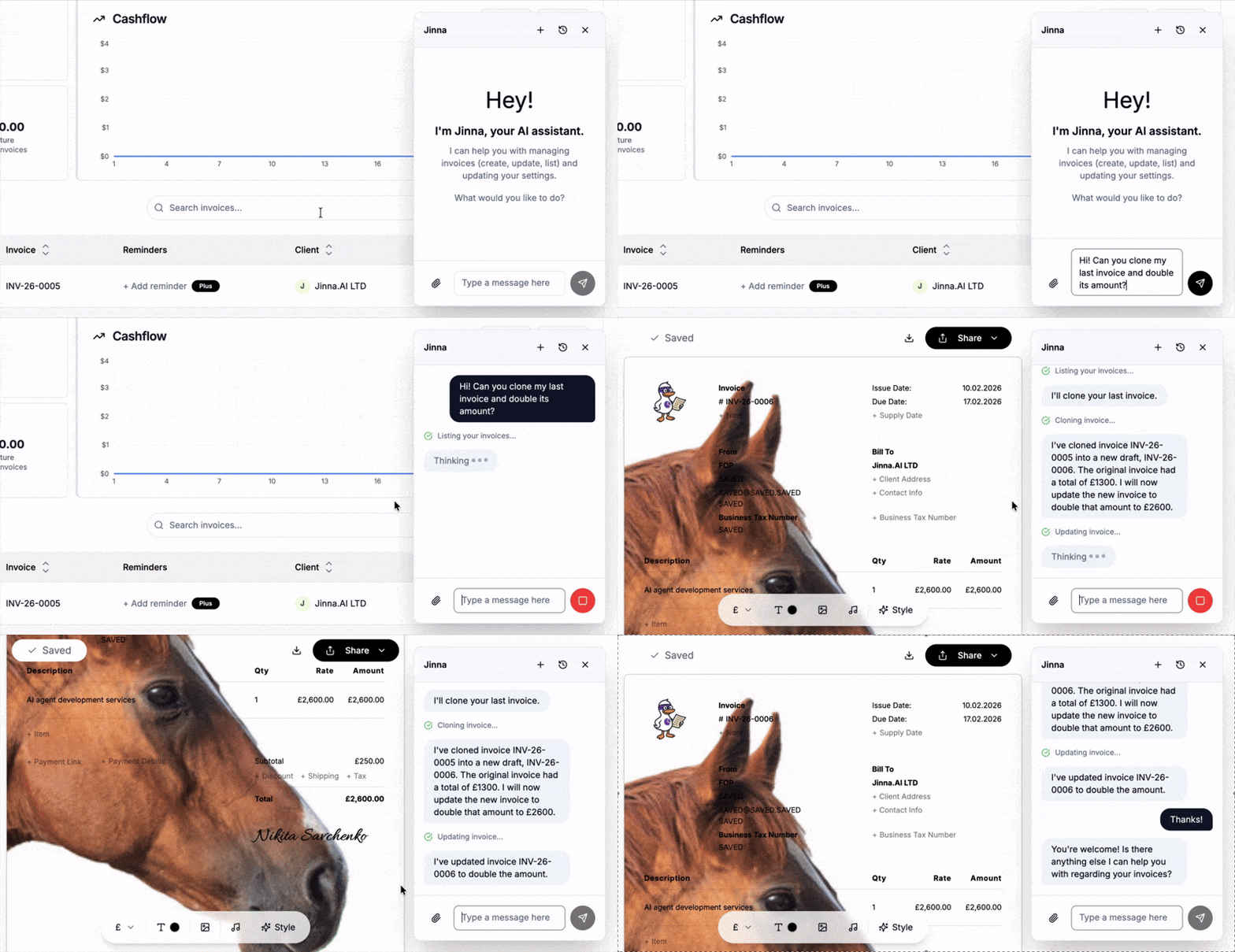
I recently embedded an AI agent into Jinna, a free invoicing tool. By the way you can log in and create beautiful✨ invoices there, for free!
It feels like magic:
- Ask an AI agent for an invoice, and it creates one.
- Understands complex requests.
- Resolves ambiguity.
- Performs a chain of updates, occasionally asking for input if needed.
In this article, I'd like to share my knowledge so you can build a similar AI agent for your SaaS, product, or app.
This article is mostly technical. I also shared my thoughts on AI agents at a recent panel discussion. If you're building something similar and want a helping hand, reach out.
You'll learn:
- How to tell whether your product needs an AI agent
- How to actually use LLMs in your product (not just chat)
- How to make an LLM execute actions, not just talk
- The ReAct loop — the core pattern behind AI agents
- System prompts, tools, and context management
- Practical tips from shipping this in production
Tip: Point Claude Code or your AI coding agent to this article during planning and it will help you to plan and build it properly!
Does your product need text-based AI assistant?
Sooner or later, people will realize that traditional web UIs we have in different products are not as comfortable and effective to use as delegating any kind of work to AI agents.
It's already here: for example, instead of filling the insurance documentation via numerous UIs - ask for it in a chat, like you'd ask your very personal concierge. Instead of browsing for airline tickets - again, just tell where you want to go and with what conditions, perfectly tailored for you, your budget and your preferences. Instead of submitting a visa application... You got it.
In 2026, we're starting this transition from "traditional" UIs to UIs that are complemented with AI Agents, able not only to consult but actually execute tasks. Every web app should consider getting one, but in one of the following forms:
- AI Chat-Based Agent alongside the "traditional" UI — the most universal option. Needs some engineering on your end, but guarantees the same result for all of your customers.
- Exposing API with documentation or MCP server — let other AI agents consume your API and work with your service, without the "native" chat-based AI agent - another agent is a consumer of your service just like humans.
There are pros and cons of each approach:
| Aspect | Chat-Based Agent | API / MCP Server |
|---|---|---|
| User experience | Conversational, low learning curve | Depends on the consuming agent, some users don't even have a personal AI Agent |
| Development effort | Higher — chat UI + agent logic + tools | Lower — document your API, ship. Likely it's already done. |
| Control over UX | Full — you design the interaction | Minimal — other agents interpret your API |
| Handles ambiguity | Can ask follow-up questions | Depends on the consumer AI Agent. API contracts are rigid |
| Reach | Your human users only * | Any AI agent can consume your service |
* You can expose your agent's chat interface as a capability for other agents — similar to what Google describes in their Agent2Agent (A2A) protocol.
What Makes an AI Agent Different from a Chatbot?
The distinction is simple: chatbots respond, agents act.
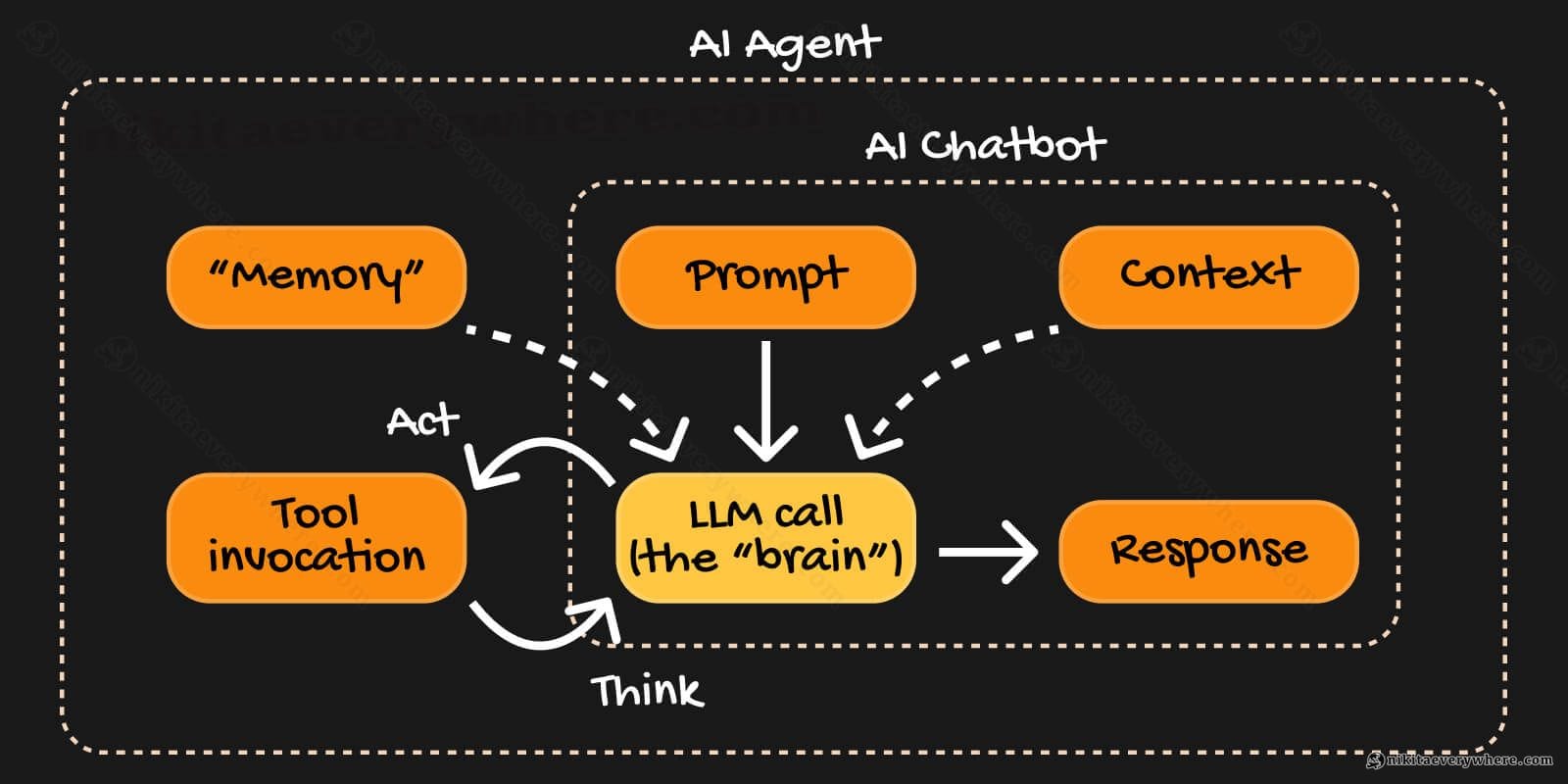
A chatbot receives a message and returns a response. An agent receives a message, thinks about what to do, uses tools to take actions, observes results, and repeats until the task is done.
Here's the difference in pseudocode:
1// Chatbot2function chatbot(message) {3 return llm.generate(message);4}5 6// Agent7function agent(message, context) {8 while (!done) {9 const thought = llm.think(message, context); // any capable LLM10 if (thought.needsTool) {11 const result = executeTool(thought.tool);12 context.add(result);13 } else {14 return thought.response;15 }16 }17}Agents use so-called "tools", remember context, and make decisions. They loop until they convince themselves they resolved the initial query or question. They're more like a colleague than a smart search bar.
Tools in this context are pre-programmed actions with some documentation. In other words, everything you'd give your AI Agent as a set of what it is able to do, for example:
- List/create/edit/delete objects and entities of your system
- Ask for a user input.
- Invoke an API endpoint.
- Everything!
Anything! The AI agent, based on the given documentation, will decide on its own what tool to use based on what they have in "context" (more on it later).
The brain metaphor works well here: input comes in, the brain processes it through layers of reasoning, decides whether to take action or respond, and if needed, loops back with new information. It's a feedback system, not a one-shot query.
The Architecture: System Overview
The Brain has six core components:
- LLM Provider — The "reasoning engine". Swappable: Gemini, Claude, OpenAI, whatever.
- System Prompt — The "personality and rules". Tells the LLM who it is and how to behave.
- Tool Registry — The "hands". Functions the agent can call to actually do things.
- ReAct Loop — The "think-act-observe" cycle. The core execution pattern.
- Context Management — The "memory". What the agent remembers about the conversation.
- Message Timeline — The "conversation log". What gets shown to the user.
Think of these like brain regions working together. Each handles a specific job, but they combine into coherent behavior.
The LLM (an actual API call to the LLM) is the reasoning core in this system — it takes inputs and produces decisions. The system prompt is the agent's upbringing and training — it shapes how the LLM thinks, makes it self-aware. Tools are the motor cortex — they translate decisions into actions. Context is memory — what's relevant from the past or in the current discussion (like, currently opened webpage). Context window — how much LLM can handle and "remember" until giving up with the final decision. And the ReAct loop is conscious thought — the iterative process of reasoning through a problem.
Later, after building the skeleton system, the actual human (developer) work is to tune this Brain. First things first — let's start with the Brain itself.
Choosing the Brain, or the Right LLM Model
The LLM is swappable — the same architecture works with Gemini, Claude, OpenAI, or any other provider. But model choice matters for UX and cost.
I've been using Gemini Flash and Pro, and the differences matter:
| Aspect | Gemini Flash | Gemini Pro |
|---|---|---|
| Speed | Fast | Slower |
| Cost | Cheaper | More expensive |
| Simple tasks | Works well | Overkill |
| Ambiguous requests | May guess and execute | More likely to ask for clarification |
| Complex reasoning | Can feel "rushed" | Thinks through the problem |
| Overall rating ⭐️ | Can feel unreliable | Great but slower |
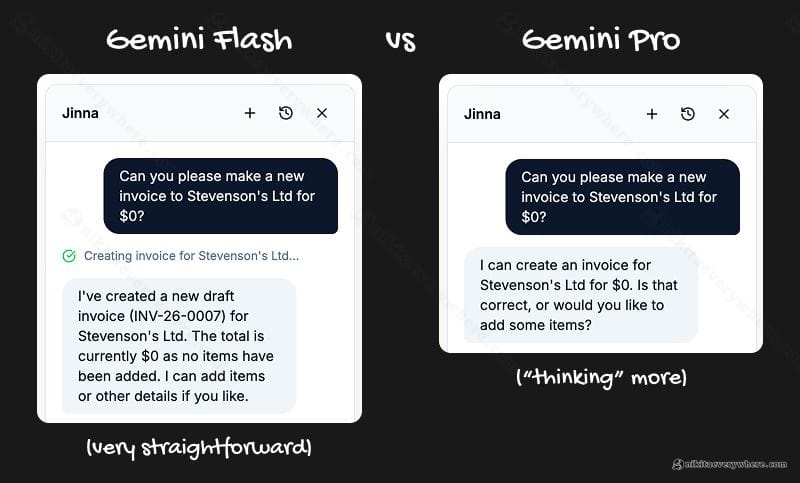
The real difference shows up in edge cases. Flash tends to execute what it thinks you mean, or quit if it's too complex. Pro tends to ask if it's unsure, processes more context and handles ambiguity a few levels deeper. Neither is always right — Flash sometimes guesses correctly and saves time; Pro sometimes overthinks or, still, misses details on the surface.
Practical advice:
- Start with Flash for prototyping — fast iteration, low cost
- Test edge cases with Pro to see what you're missing
- Consider using Flash for simple read operations, Pro for writes and complex logic
- Or: use Flash by default, escalate to Pro for multi-step tasks
The ReAct Loop: How the Brain Thinks
ReAct stands for "Reason + Act." It's the core pattern that makes agents work.
The loop:
- Analyze — Look at the user's request and current context
- Decide — Determine if a tool is needed or if you can respond directly
- Execute — If a tool is needed, call it
- Observe — See what happened
- Loop or Respond — Either continue (with new information) or return the final response
Here's a real example. The user says: "Create a new invoice for Acme"
Iteration 1 — Lookup:
- Analyze: User wants an invoice for "Acme" but no specific customer details
- Decide: Search existing customers to find the right one
- Execute:
searchCustomers({ query: "Acme" }) - Observe: Found 2 matches — "Acme Corp" (acme@corp.com) and "Acme Studios" (hello@acmestudios.io)
Iteration 2 — Ask for clarification:
- Analyze: Ambiguous — two customers match
- Decide: Need to ask which one
- Respond: "I found two customers matching 'Acme': Acme Corp (acme@corp.com) and Acme Studios (hello@acmestudios.io). Which one?"
- User replies: "Acme Corp"
Iteration 3 — Create invoice:
- Analyze: User confirmed Acme Corp, have all details from lookup
- Decide: Create the invoice
- Execute:
createInvoice({ clientName: "Acme Corp", clientEmail: "acme@corp.com" }) - Observe: Invoice INV-456 created
Iteration 4 — Respond:
- Respond: "Done! Created draft invoice INV-456 for Acme Corp. Want me to add line items?"
This demonstrates three key agent capabilities: data lookup, user disambiguation, and action execution.
Here's a simplified Node.js implementation:
1async function reactLoop(userMessage, maxIterations = 10) {2 const context = buildContext(); // Whatever context we want3 const messages = [{ role: "user", content: userMessage }];4 5 // Work until LLM doesn't invoke tools anymore6 for (let i = 0; i < maxIterations; i++) {7 // Abstract function to generate a call to LLM (API, etc)8 const response = await llm.generate({9 systemPrompt: buildSystemPrompt(context),10 messages, // Supplies message history so that LLM knows the context11 tools: toolRegistry, // Tells LLM what tools we have12 });13 14 if (response.toolCalls?.length > 0) {15 for (const call of response.toolCalls) {16 const result = await executeTool(call);17 messages.push({ role: "tool", content: result });18 }19 } else {20 return response.content; // Done — return final response21 }22 }23 24 return "I couldn't complete this request. Please try again.";25}Most requests complete in 1–3 iterations. The max of 10 is a safety net to prevent runaway loops.
The System Prompt: Teaching the Brain How to Think
The system prompt is where you define the agent's personality, capabilities, and constraints. It's the most important piece of "prompt engineering" in the whole system.
A good system prompt has four sections:
- Identity and role — Who is the agent? What's its purpose?
- Current context — What's the date? Where is the user? What page are they on?
- Response guidelines — How should it format responses? What tone?
- Tool usage instructions — When and how to use each tool
Here's a simplified version:
1function buildSystemPrompt(context) {2 return `You are Jinna, an AI assistant for invoice management.3 4Current date: ${new Date().toLocaleDateString()}5User is on this page: ${context.currentPage}6 7Guidelines:8- Be concise. Most responses should be 1-2 sentences.9- Use tools to take action, don't just describe what you would do.10- If the user's request is ambiguous, ask for clarification.11- Always confirm destructive actions before executing.12 13Available tools:14- getInvoice: Retrieve invoice details15- createInvoice: Create a new invoice16- updateInvoice: Modify an existing invoice17- deleteInvoice: Delete an invoice (CONFIRM FIRST)`;18}The "page context" trick is underrated. The frontend sends the current URL and page state, so the agent knows where the user is. "Delete this invoice" means something different on an invoice detail page vs. the invoice list.
The Tool Registry: Giving the Brain Hands
Tools are functions the agent can call. Each tool can have:
- name — Unique identifier
- description — What it does (this is what the LLM reads to decide when to use it)
- parameters — JSON schema of required/optional inputs
- type — UX category (read, write, destructive, external)
- handler — The actual function to execute
Tool types control UX behavior:
- read — Auto-execute, no confirmation needed (e.g.,
getInvoice) - write — May show a toast notification (e.g.,
updateInvoice) - destructive — Always confirm before executing (e.g.,
deleteInvoice) - external — Show a warning about external action to the current system (e.g.,
sendEmail)
Here's a tool registry example. The handler is your actual backend logic, while description and parameters get serialized into text for the LLM call — that's how the LLM knows what each tool does:
1const toolRegistry = [2 {3 name: "getInvoice",4 description: "Get details of a specific invoice by ID",5 parameters: {6 type: "object",7 properties: {8 invoiceId: { type: "string", description: "The invoice ID" },9 },10 required: ["invoiceId"],11 },12 type: "read",13 handler: async ({ invoiceId }) => {14 const invoice = await db.invoices.findById(invoiceId);15 return JSON.stringify(invoice);16 },17 },18 {19 name: "createInvoice",20 description: "Create a new invoice for a client",21 parameters: {22 type: "object",23 properties: {24 clientName: { type: "string" },25 clientEmail: { type: "string" },26 dueDate: { type: "string", description: "ISO date string" },27 },28 required: ["clientName"],29 },30 type: "write",31 handler: async ({ clientName, clientEmail, dueDate }) => {32 const invoice = await db.invoices.create({33 clientName,34 clientEmail,35 dueDate,36 });37 return JSON.stringify(invoice);38 },39 },40 {41 name: "deleteInvoice",42 description: "Permanently delete an invoice. Use with caution.",43 parameters: {44 type: "object",45 properties: {46 invoiceId: { type: "string" },47 },48 required: ["invoiceId"],49 },50 type: "destructive",51 handler: async ({ invoiceId }) => {52 await db.invoices.delete(invoiceId);53 return `Invoice ${invoiceId} deleted`;54 },55 },56];The description is what the LLM reads to decide when to use a tool. Spend time on these. "Get details of a specific invoice by ID" is better than just "Get invoice" — it tells the LLM exactly what the tool does and what it needs.
Context Management: The Brain's Memory
Agents need memory. Without it, every message is a fresh start. But you can't just dump the entire conversation history into the prompt — token limits make that impossible for long conversations.
I mix in a few types of context:
- Session Summary — A rolling ~250 word summary of the conversation so far, regenerated on every complete AI Agent response.
- Page Context — Where the user is, what they're looking at right now
- Chat History — A few plain messages from the chat history with all the details for AI Agent to have the proper conversation flow.
The session summary is regenerated periodically:
1async function updateSessionSummary(messages, currentSummary) {2 const recentMessages = messages.slice(-10); // Last 10 messages3 4 const prompt = `Current summary: ${currentSummary || "None"}5 6Recent conversation:7${recentMessages.map((m) => `${m.role}: ${m.content}`).join("\n")}8 9Write a brief summary (max 250 words) of the key points,10decisions made, and current state. Focus on what's relevant11for continuing the conversation.`;12 13 return await llm.generate(prompt);14}Why a summary instead of full history? You don't remember every word of every conversation you've had. You remember the gist — the key facts, the decisions, the current state. That's what the summary provides.
Page context is simpler — it's just data from the frontend about the current UI state. What page is the user on? What invoice are they viewing? What filters are applied? This context is fresh every message and costs very few tokens.
Mixing all 3 components gives the LLM enough context to give relevant responses and stay aware of the conversation state.
The Message Timeline: Making It Visible
Users should see what the agent is doing. Transparency builds trust.
I use three message types in the UI, though you may want fewer or more depending on your use case:
- thought — The agent's internal reasoning (shown in gray, collapsible)
- tool — Tool calls and their results (shown with tool icons)
- response — The final message to the user (normal chat bubble)
1const timeline = [2 {3 type: "thought",4 content: "User wants to create an invoice. I'll need to use createInvoice.",5 timestamp: "2026-02-09T10:00:00Z",6 },7 {8 type: "tool",9 name: "createInvoice",10 input: { clientName: "Acme Corp" },11 output: { id: "inv_123", status: "draft" },12 timestamp: "2026-02-09T10:00:01Z",13 },14 {15 type: "response",16 content:17 "Done! Created a draft invoice for Acme Corp. Want me to add line items?",18 timestamp: "2026-02-09T10:00:02Z",19 },20];Exposing the agent's thinking makes debugging easier for you and builds confidence for users. When they see "I'm checking your invoice history..." before getting a result, they understand the agent is doing real work, not just hallucinating.
Tuning the Brain: User Journey Optimization
Building the agent is step one. Tuning it for great UX is an ongoing process.
Four areas to optimize:
1. Response length
LLMs love to be verbose. Fight this. Add explicit instructions like "Most responses should be 1-2 sentences" and "Don't explain what you're about to do — just do it."
2. Confirmation UX
When should the agent ask for confirmation vs. just act? Destructive actions always need confirmation. But for writes, it depends — creating a draft invoice is low-risk, but sending an email is high-risk. Tune your tool types accordingly.
3. Error handling
What happens when a tool fails? The agent should explain what went wrong in plain language and suggest next steps. "I couldn't find an invoice with that ID. Want me to search by client name instead?"
4. Proactive suggestions
After completing a task, should the agent suggest next steps? Sometimes yes — "Invoice created. Want me to send it to the client?" But not always — don't be annoying.
What I Learned: Practical Tips
-
Start with 3–5 tools, not 30. More tools = more confusion for the LLM. Add tools only when you have clear use cases.
-
Tool descriptions are prompts. Spend time on them. They're as important as the system prompt itself.
-
Log everything in development. Every prompt, every tool call, every response. You'll need this for debugging at some point when AI Agent reasoning is unclear.
-
Test tool combinations. Agents chain tools in ways you don't expect. "Create an invoice and send it" requires both
createInvoiceandsendEmailto work together. -
Handle partial failures gracefully. What if the invoice was created but the email failed? The agent should tell the user what succeeded, not just what failed.
-
Session summaries need tuning. Too short and context is lost. Too long and you waste tokens. ~250 words works for most use cases.
-
Page context is underrated. Knowing the user is on
/invoices/inv_123changes everything. "Delete this" suddenly has a clear referent.
Bigger Picture: Where This Is Going
AI agents are already as smart as humans in many ways. Sometimes I catch myself thinking that humans function like AI agents too — we have our own system prompts 🧠 (upbringing), tools (skills), and context (memory). The line is blurring.
Soon enough, we'll be teaching our own robots like in the movie "Robots" — the way that film illustrates learning and growth is surprisingly close to how it actually works.

For those worried about AI replacing everything: yes, AI can reason faster than any human. But there's what I call the Exponential Complexity Barrier.
Think about software: the more you build, the more coupled and exponentially complex the system becomes. Today you can start entire companies solo, but supporting them becomes harder — exponentially — as you add features. At some point, it's easier to start over than maintain a system with millions of dependencies, if-elses, processes, and human loops.
Every AI system faces this. The more they're trained, the more exponentially complex they become, and hence less flexible. We have LLMs that are perfect for specific and even generic tasks, but "AGI" — true general intelligence — is still beyond that exponential complexity barrier.
So build your agents. They'll handle your invoices, your customer support, your data pipelines. But they won't replace your judgment and the "human touch" — at least we're not yet there.
Conclusion
Building an AI agent isn't magic — it's architecture.
The Brain pattern gives you a clear mental model: LLM + Tools + ReAct Loop + Context + System Prompt. Each component has a job. Together, they create an agent that can actually do things, not just chat.
Design each component well, and you'll end up with an agent that feels like a capable colleague rather than a confused autocomplete.
The code examples above are simplified, but the architecture is real. It's running in production at Jinna today, powered by Cloud Run and GCP. If you build something similar, I'd love to hear about it — feel free to reach out!