
Google Deleted 10 Years of My Location History
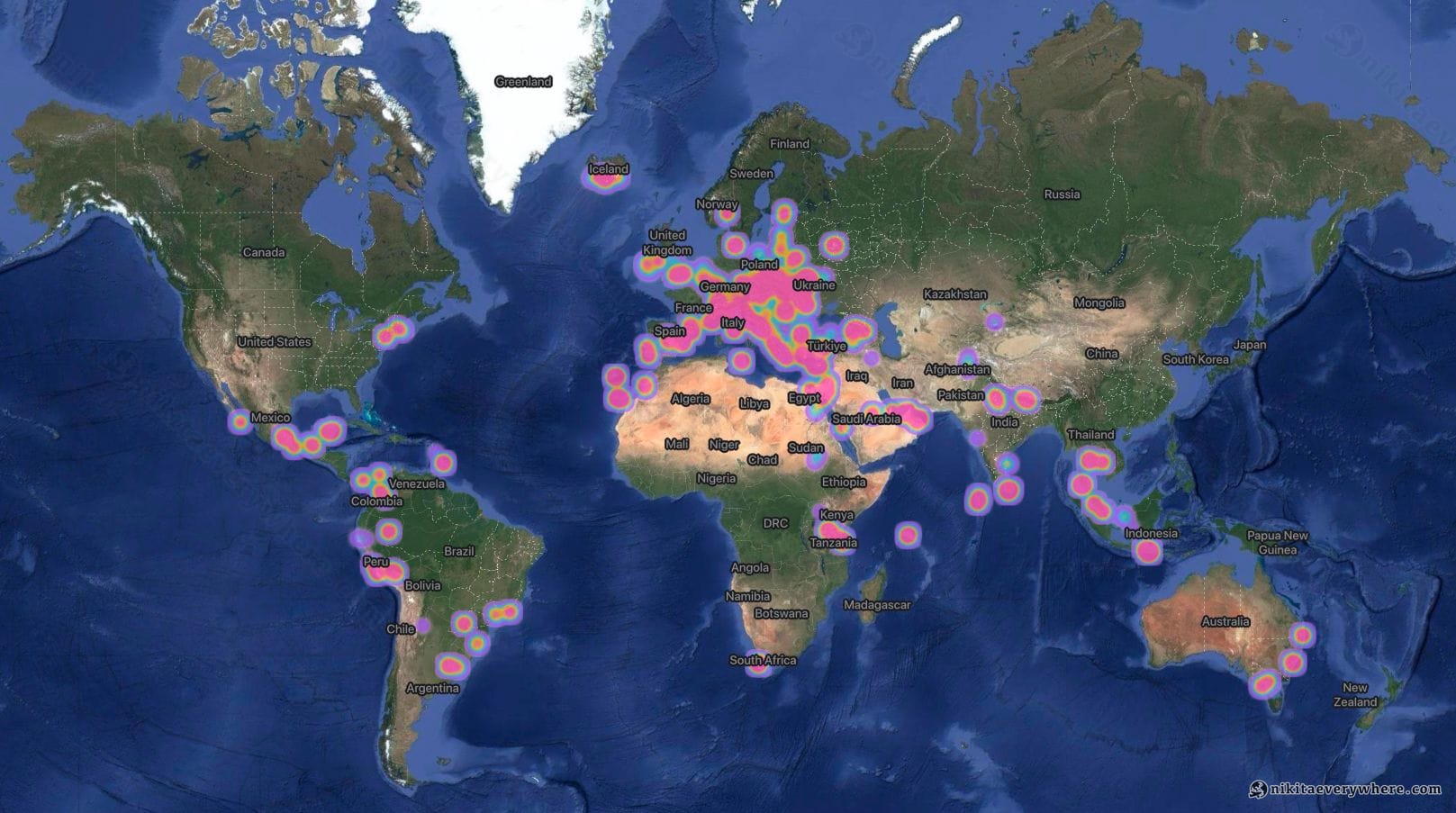
I love Google. I worked at Google. It was my childhood dream to work there, and I made it happen. So what I'm about to tell you isn't coming from a place of hate — it's coming from a place of genuine disappointment.
Google deleted 10 years of my location history. Not intentionally, but that doesn't make it any better.
The Beginning: 2015
It all started back in 2015 when Google introduced Location History. That same year, I was just beginning my journey as a traveler — visiting the USA for my summer internship, which was only my 4th country ever. I immediately enabled the feature on my Android device. Here was a way to record everywhere I'd ever been, creating a digital diary of my movements that I could analyze someday.
I didn't know exactly what I'd do with all this data. Maybe AI would help me make sense of it eventually, before it even existed. Maybe I'd create visualizations of my travels. What I did know was that having 5, 10, 15 years of location data would be invaluable — and extremely valuable — especially for someone like me.
You see, I'm a frequent traveler. As I write this, I've visited 78 countries, and I'm not planning to stop. The next target is 80, then 100. For someone who travels this much, location history isn't just a nice-to-have feature — it's essential. Every place I visit becomes a potential recommendation for friends. Every route I take becomes a reference for future trips. Every restaurant, every landmark, every hidden gem gets recorded in my timeline.
I'm also the kind of person who doesn't like to remember stuff. Why memorize something when it's stored in my digital library? If it's organized somewhere, I can grab it whenever I need it. My Location History was exactly that — an organized, searchable record of everywhere I'd been for over a decade.
The Warning: November 2024
On November 19, 2024, I received an email from Google with a peculiarly calm subject line:
"Keep your Timeline? Decide by May 18, 2025"
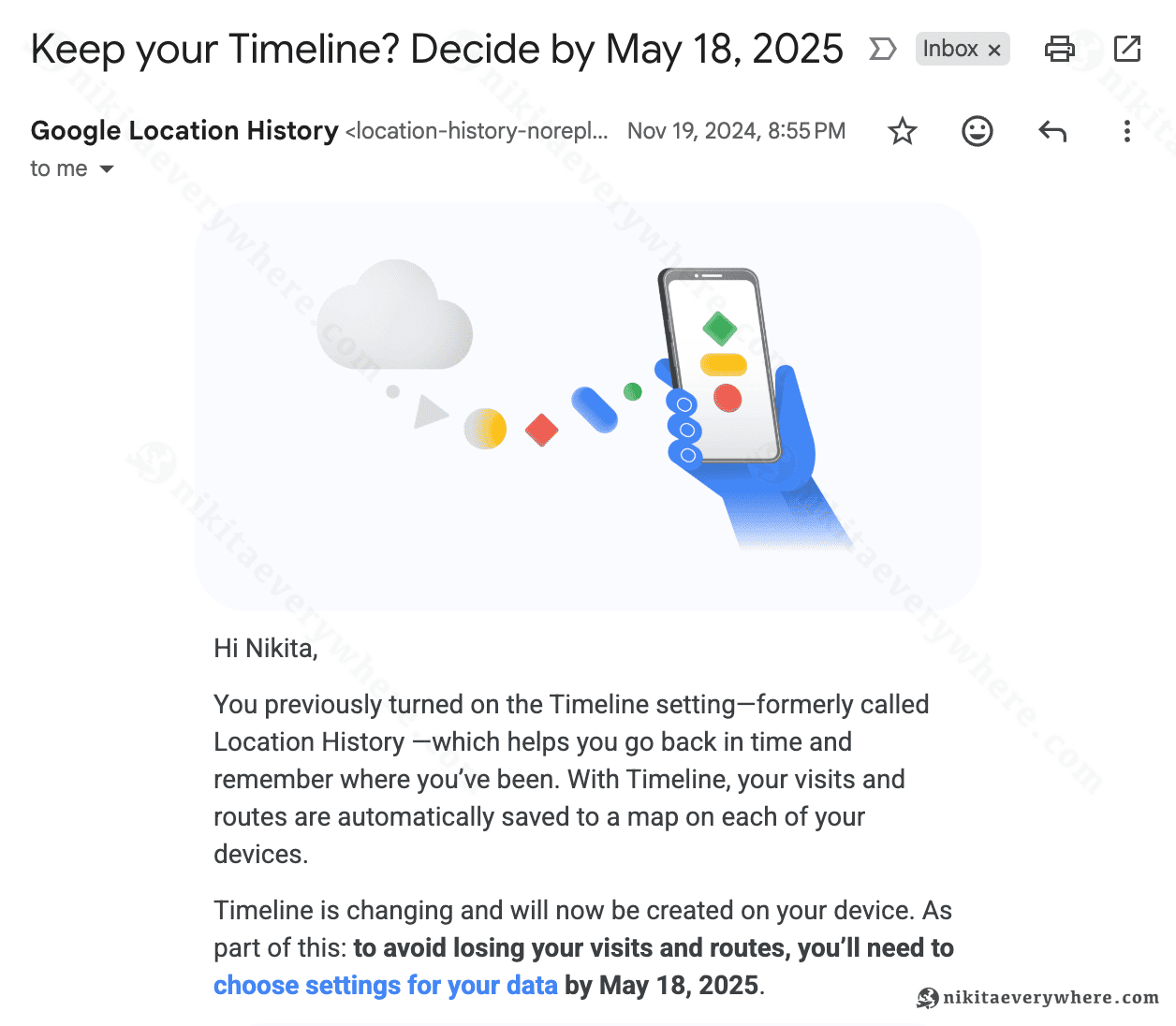
I remember thinking: Well, of course I want to keep my Timeline. I'd been collecting this data for many years. Why wouldn't I want to keep it?
But here's the thing — the email wasn't screaming at me. It wasn't warning me that my data was about to be deleted. It was just... casually asking if I wanted to keep my timeline.
So I did what the email asked. I went into the Google Maps application on my iPhone and pressed whatever button or toggle they told me to press. Something about keeping the location synced or backed up. I enabled it, archived the email, and moved on with my life.
I felt safe. I'd taken the action. My years of location data were secure.
Or so I thought.
The Device Change: December 2024
Around December 2024, I changed my iPhone. Standard procedure — I hovered my new phone over my old one, let iOS do its magic, and all my data synced over. Apps, settings, photos, everything transferred seamlessly. Just like it had done every time I'd upgraded before.
Then I wiped my old phone. Completely erased it. Because why would I keep it? All my data was on the new device and in the cloud. That's how it's supposed to work, right?
Little did I know that I had just deleted the only copy of 10 years of my location history.
The Discovery: September 2025
Months passed. I traveled. I lived my life. Occasionally, I'd check my Google Maps Timeline to look up a place I'd visited — maybe to recommend it to a friend, or just to reminisce.
Then one day in September 2025, I opened Google Maps on my desktop and saw a message I'd never seen before:
"Location history is now available only on the phone."
Okay, I thought. Let me check my Timeline in the Google Maps app on my phone.
I opened the app. Navigated to Timeline. And what I saw made my stomach drop.
Nine months of history.
That's it. Nine months. Out of 10 years.
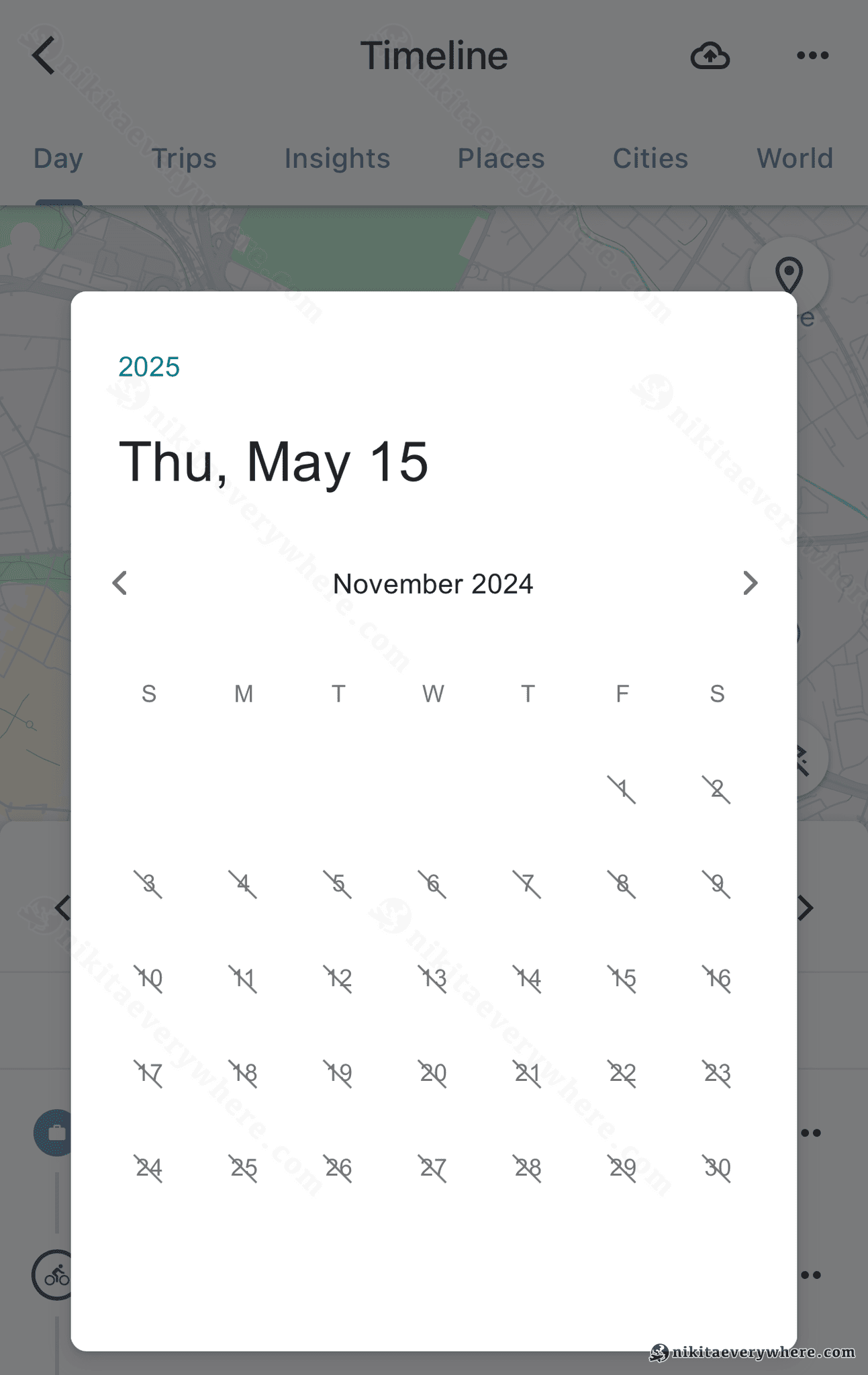
Everything before late 2024 was gone. Vanished. Deleted. Ten years of location data — everywhere I'd been, every country I'd visited, every route I'd taken — wiped out.
I frantically checked Google Takeout, Google's service for downloading your data. Maybe I could find a backup there?
Nothing. The Location History export was empty.
What happened to my data? Where did 10 years of my life go?
What Actually Happened
After extensive research and conversations with Google Support, I finally pieced together what went wrong.
In December 2023, Google announced a major change to how Location History works. They were transitioning from cloud-based storage to on-device storage. The official reason was privacy — keeping your location data on your phone instead of Google's servers.
Here's what this actually meant: all your historical location data — previously stored safely in Google's cloud — was moved to your phone's local storage. Google also introduced an optional encrypted cloud backup feature that would sync your on-device Timeline data back to their servers.
But wait — I received that email! I pressed that button! I opted in to keeping my data!
Yes, and here's where it gets confusing. When you "opted in" to keep your Timeline, what you were actually doing was enabling this new encrypted cloud backup. But here's the critical detail nobody made clear: when you change phones, you have to manually ensure your old phone's backup is downloaded and synced to your new device.
This wasn't automatic (was it??). It wasn't seamless. It wasn't even clearly explained.
I don't even know if I had the backup properly enabled on my old phone. And even if I did — phone backups expire after about 3 months if not downloaded. So when I wiped my old iPhone and set up the new one, I had no idea there was a manual step required to preserve my Timeline data.
The result? My 10 years of location history existed only on a phone I had just erased (in fact, probably there!). The cloud backup — if it ever existed — had either expired or was never properly synced to my new device.
Gone.
To make matters worse, in March 2025, Google confirmed that a "technical issue" had caused permanent data loss for many users. According to The Register, only users who had manually enabled encrypted cloud backups before the incident could recover their data. And even for some of them, it didn't work.
The Failed Recovery
I contacted Google Support. Actually, I contacted them multiple times. First through Google One support, then through EEA support. I spoke with three or four different agents.
Every single one of them told me the same thing:
"Your data is gone. It's not possible to recover it."
Here's the actual response I received from Google EEA Support:
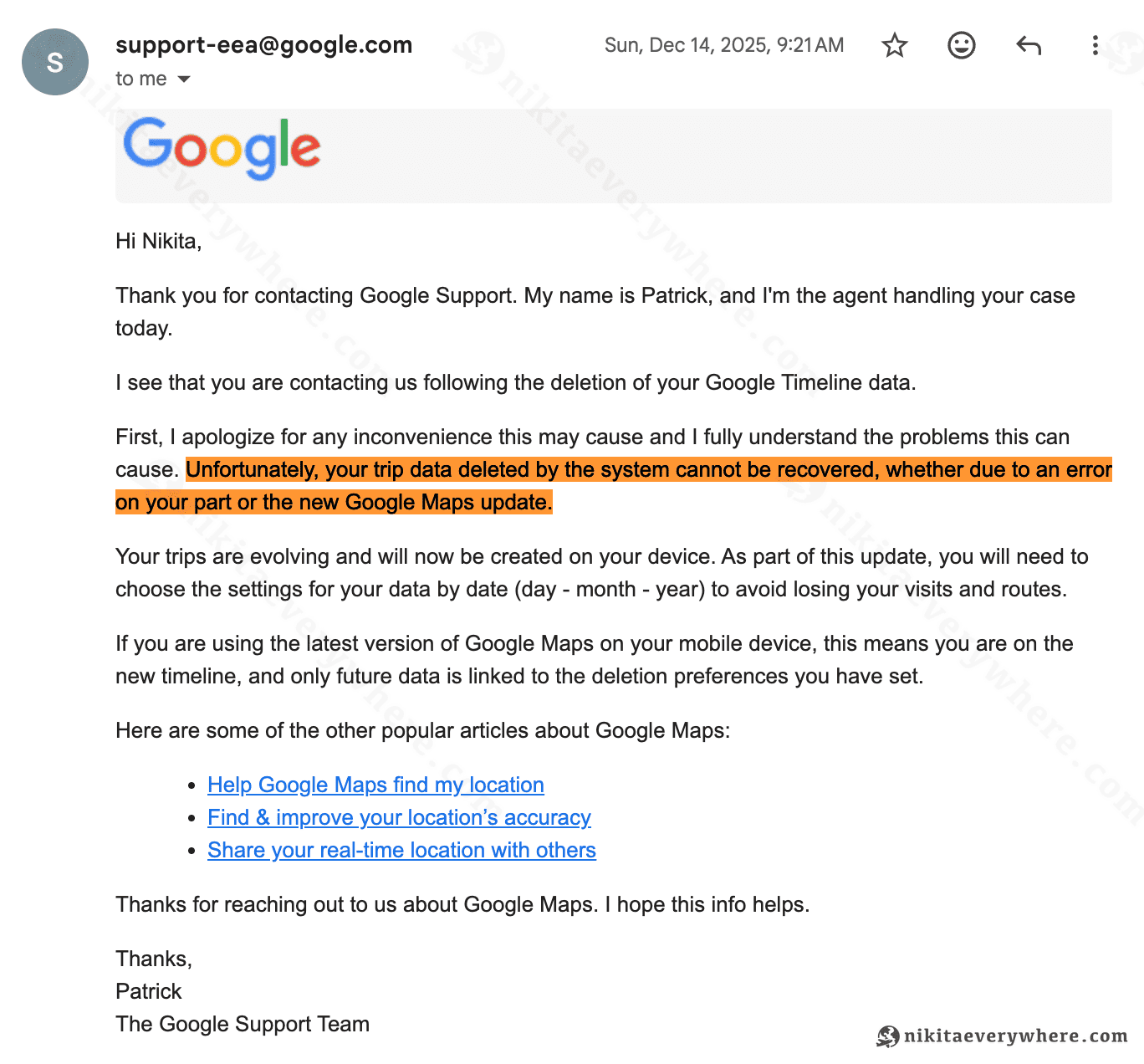
Note the highlighted part: "Unfortunately, your trip data deleted by the system cannot be recovered, whether due to an error on your part or the new Google Maps update." They're literally admitting that either I made an error, or their update caused it — and either way, they can't help.
What really got to me was when the support agents mentioned — almost casually — that a lot of people are experiencing this problem. It wasn't just me. Thousands, maybe millions of users had lost years of location history because of how this transition was handled.
They knew. Google knew this was happening to people. And their response was essentially: "Sorry, nothing we can do."
A Product Decision I Can't Understand
I've worked in tech. I understand product decisions sometimes involve trade-offs. But this one... this one I cannot comprehend.
Let me paint an alternative picture of how this transition could have been handled:
-
Send an email that actually conveys urgency. Not "Keep your Timeline? Decide by May 18, 2025." Something like "ACTION REQUIRED: Your location history will be permanently deleted unless you take these steps."
-
Make device transfers seamless. When setting up a new phone with the same Google account, automatically detect and restore the Timeline backup. This is how every other Google service works — why should Location History be different?
-
Warn users when they change devices. A simple prompt in Google Maps: "Your Location History backup hasn't been transferred to this device. Do you want to download it now?" Or better yet — warn users BEFORE they wipe their old phone.
-
Don't expire backups after 3 months. If someone has been collecting location data for a decade, why would their backup expire in 90 days?
Instead, Google chose to:
- Send a vague, non-urgent email
- Require a manual, undocumented step when changing phones
- Expire backups after just 3 months
- Provide no recovery option
- Acknowledge (after the fact) that a "technical issue" made things even worse
This isn't some small startup making rookie mistakes. This is Google. A company I loved. A company I worked for. A company with some of the best engineers in the world.
And they made a product decision that resulted in the irreversible deletion of millions of users' personal data.
It's worth noting that Google is currently facing a class action lawsuit over similar issues with Google Drive data deletion. And I'm far from alone — Reddit is full of people sharing similar experiences:
- A roundup of folks that have lost their Timeline data
- Timeline deleted
- Google accidentally deletes Google Maps Timelines
- I have 8 years of Timeline data and don't want it deleted
The Silver Lining: Google Photos
Here's the only good news in this story: I still have my Google Photos library.
Google Photos has a feature called Map View (also known as the heat map) that shows you where you've taken photos. To access it on your phone:
- Open the Google Photos mobile app
- Go to Collections
- Tap on the Places map card
- Explore the heat map of your photo locations
It's not perfect — it only shows locations where I took photos, not everywhere I went. But at least I have some visual record of my 78 countries. The colored dots on the heat map are now my only proof that I actually visited all those places.
Moving Forward
Despite everything, I still love Google. I still use their products daily. This experience hasn't changed that — but it has changed how I approach my data.
The lesson here isn't "don't use Google." The lesson is: always have backups, even for services you trust completely.
I trusted Google with 10 years of location data because it felt safe in the cloud. It wasn't. Now I know better. If you're reading this and your Timeline data is still intact, please — export it. Back it up. Don't assume any cloud service, no matter how big or reliable, will keep your data safe forever.
If anyone has ideas for reliable backup strategies for Google services, or alternative location tracking solutions that prioritize user data ownership, I'd love to hear them.
One More Thing: A Tool I'm Considering Building
Here's an idea that's been floating around in my head since this happened.
I've been uploading photos to Google Photos since the service launched around 2013. That library is still intact — for now. And I still have some Location History data (even if it's just 9 months instead of 10 years). What if I could build a service that:
- Takes your Google Photos library and Google Location History export
- Extracts location metadata and AI-generated descriptions from each photo
- Combines it with whatever Timeline data you still have
- Creates a searchable "chat with your location history" experience using an LLM
Basically, piece together your travel history from multiple sources and make it actually useful — with AI-powered search and insights.
If you think you'd use something like this, let me know by pressing this button:
No promises, but if enough people are interested, I might actually build it.
Thanks for reading this far. If you've experienced something similar with Google Location History, you're not alone. And if you haven't — consider this your warning to backup your Timeline data before it's too late.